Client is waiting for an operator
Payment or refund
Sophie Walker+34 612 345 678Instagram1 min ago
Open chatHand back to AI

Solwees answers your clients’ calls and chats, and hands a conversation to a person when the client is upset, asks for a person or wants something outside your rules. Your team gets an alert with the reason and takes the chat over by typing.
Handed to the team: payment or refund
The assistant waits an hour after Emma’s reply
Sophie writes to Studio Demo on Instagram about a double charge. The assistant passes it to the team, Emma answers, and the assistant stays out of the way.
The assistant hands the chat over when the client is upset, asks for a person, wants something outside your rules, or meets one of the reasons you write yourself.
A complaint, a refund, a request to talk to someone: the conversation goes to your team, and the client is told that a person will answer.
A private event, a gift certificate, a booking your booking system would not accept, a question only someone on site can answer.
Write them in plain words: a discount the client asks for, a health concern, a bridal booking. A question the assistant has no answer to is passed on too, instead of guessed.
At night the assistant stays in the chat: it tells the client the request is passed on, alerts the team and keeps answering everything else.
AI assistant › Profile › Handover
When to hand the chat to a person
Handoff reasons
Your reasons
Hand over when a client is late
The chat goes to the front desk at once, the assistant asks nothing
Hand over when the writer is not a client
On by default: a supplier, an agency, a blogger, your own staff
Hand over when the client sends only an emoji
An emoji that answers the assistant’s own question still counts as an answer
The moment the assistant hands a chat over, a card appears in the dashboard: who is waiting, why, in which channel, and two ways to answer.
“Payment or refund”, “booking change or cancellation”: the team sees what it is about before opening the chat. The assistant’s note in the chat says what the client wants.
Open the chat and answer, or hand it back to the assistant if it can carry on.
The panel plays a sound and rings again every few minutes while nobody has picked up. In the chat list the chat is marked “Awaiting admin”, with the reason.
Needs attention
Sound onClient is waiting for an operator
Payment or refund
Sophie Walker+34 612 345 678Instagram1 min ago
In the chat list
Sophie Walker18:01
Can someone check?
Awaiting admin · payment / refundInstagram
AI note: Charged twice for yesterday’s manicure, asks to check the payment.
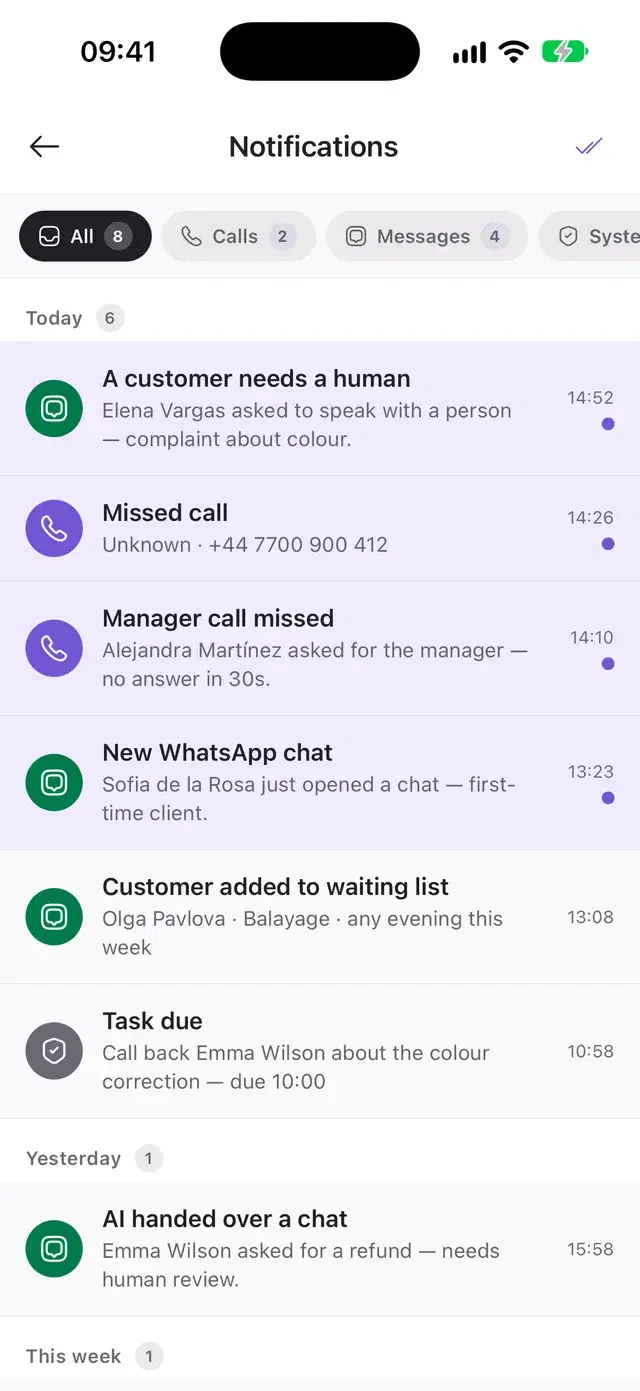
Besides the card in the dashboard, the handoff reaches the team’s phones: a push in the Solwees app, a message in Telegram and, now, in WhatsApp.
The mobile app shows who needs a person and opens the chat in one tap.
A personal chat with the bot or your team’s group. Task reminders arrive there too.
A message from your own connected number to the staff you choose: the client, the phone, the channel, the request and a button to open the chat.
Solwees app
Solweesnow
A customer needs a human
Sophie Walker needs a human. Charged twice for yesterday’s manicure, asks to check the payment.
Telegram · team group
🔔 A customer needs a human
🏢 Studio Demo
Charged twice for yesterday's manicure, asks to check the payment.
👤 Sophie Walker · +34 612 345 678
The Telegram alert arrives in English
WhatsApp · Emma's phone
Hello! A customer needs your team. Customer: Sophie Walker Phone: +34 612 345 678 Channel: Instagram Request: Charged twice for yesterday’s manicure, asks to check the payment. Please open the chat and reply to the customer as soon as possible.
18:01In Settings › Notifications you add the numbers of the people who should hear about a handoff, each with a name, a language and the reasons they handle.
Each number gets the alert in English, Spanish or Russian.
The events manager gets events and large parties, the owner complaints and refunds, the front desk every handoff.
Settings › Notifications
WhatsApp alerts
When the assistant hands a client to a person, the request summary goes to your team on WhatsApp from your connected number.
Numbers
Emma Clarke
+34 600 111 222 · English · last alert 18:01
Events
+34 600 333 444 · Spanish · no alerts yet
Owner
+34 600 555 666 · English · last alert yesterday
The assistant does not reply to these numbers on WhatsApp, so your team can answer an alert without starting a chat with it.
A teammate takes the conversation by writing in it. The assistant goes quiet and waits, and the client sees one conversation without a break.
The first message from a person moves the chat from AI to Admin. The whole history and the client card are on the same screen.
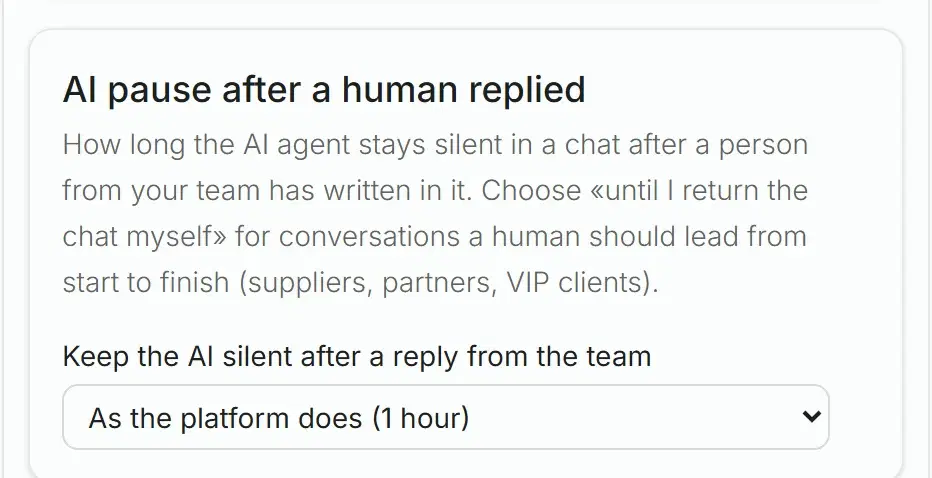
After a person replies the assistant stays quiet: an hour by default, or as long as you set (up to a week), or until the chat is handed back.
One tap returns the chat to the assistant. It can also come back by itself after the team has been inactive for the time you choose.
The same works in the mobile app: open the chat from the alert and answer.
Can someone check?
SolweesI’ve passed it to the team: a manager will check the payment and answer you here.
EmmaSophie, I can see the double charge. I’ve refunded €35.
The assistant stays quiet for an hour after Emma’s reply
Some messages are not for the assistant: a regular thanks her specialist, a partner writes about something else. Mark the reply, and the assistant steps back.
The action is in the menu of every assistant reply in the chat.
The assistant stays silent in this chat until someone from the team gives it back.
The marked reply is saved with the conversation as a case.
Olivia, thank you for yesterday! The nails are perfect ❤️
SolweesThank you, Chloe! Would you like to book your next manicure?
The chat is paused: the AI stays silent until you give it back. The case is saved.
If Instagram loses access after a password change, clients keep writing and the answers stop reaching them. Solwees notices and tells you.
Solwees checks its access to Instagram, Facebook, WhatsApp through the official API and the Telegram bot.
A notice in the dashboard, a push in the app and a message in your Telegram chats, with a link to reconnect. It repeats while the channel is down.
Once the channel is reconnected, a second notice says the assistant is answering clients again, and how long it was down.
Settings › Channels
Channels
Checked every 15 minutes
Notices
Instagram is not working09:15
Instagram (@studio.demo) has not been working since 09:12. The assistant’s replies do not reach your clients. Reconnect the channel in Settings › Channels.
Instagram is working again11:20
Instagram (@studio.demo) is connected again, and the assistant is answering clients. It was down for about 2 h.
Arrives in:DashboardAppTelegram
When the assistant has handed a complaint to a person, a campaign can write to the client later, once the manager has finished, and ask whether everything is resolved.
While the manager is still talking to the client, the message waits. If the conversation goes on too long, it is not sent.
No more often than you allow: one such message per client a week by default.
You write the message for each language and choose how many hours after the complaint it goes.
The next day
What happens when a person is needed, part by part.
In the assistant’s profile, add the cases your team wants to handle itself.
Install the mobile app, connect Telegram and add WhatsApp numbers in Settings › Notifications.
They decide what the client is told at night and when a person can join a call.
Solwees alerts your team and tells the client that a person will look into it. The alert carries the reason: a card in the dashboard, a push in the mobile app, and a message in Telegram and WhatsApp if you connected them. When the client asks for a person during working hours, the chat is handed over: it waits for an operator and the assistant stays silent in it. When a manager only needs to check something, the assistant keeps answering the client’s other questions.
When a client asks for a person, is upset or complains, and in the situations you list in the assistant’s settings: refunds, events, gift certificates, unusual requests, any cases you name. A question it has no answer to is passed on the same way instead of guessed. At night the assistant stays in the chat: it tells the client the request is passed on, alerts the team and keeps answering everything else.
Open the chat in the web dashboard or the mobile app and start typing: the chat is yours and the assistant stays silent in it, for an hour after your reply by default or for as long as you set. You hand it back with one tap, or a setting returns the conversation to the assistant after the period of staff inactivity you choose. The whole history and the client card are on the same screen.
On Instagram and Messenger a person can reply within 7 days of the client’s last message. On a phone call a person can join only in working hours and only by answering the call within 30 seconds. At night the assistant stays in the chat: it tells the client the request is passed on, alerts the team and keeps answering everything else.
Yes. In Settings › Notifications add your team’s numbers, each with a name, the language of the message (English, Spanish or Russian) and the reasons it should get, or all handoffs. The alert goes from your connected WhatsApp number with the client, the channel, the request and a button to open the chat.
Solwees checks its access to Instagram, Facebook, WhatsApp through the official API and the Telegram bot every 15 minutes. If access is lost, for example after a password change, you get a notice in the dashboard, the app and Telegram with a link to reconnect, and another one when the channel works again.
Write when to hand over and choose who gets the alerts: your team joins only where a person is needed.