
Clients write in Instagram Direct. Solwees books them from a photo.
Solwees answers your Instagram Direct around the clock: it looks at the photo a client sends, names the service and the price, finds a free time and books the visit in your booking system. It answers replies to your stories too, and comments once you switch them on.
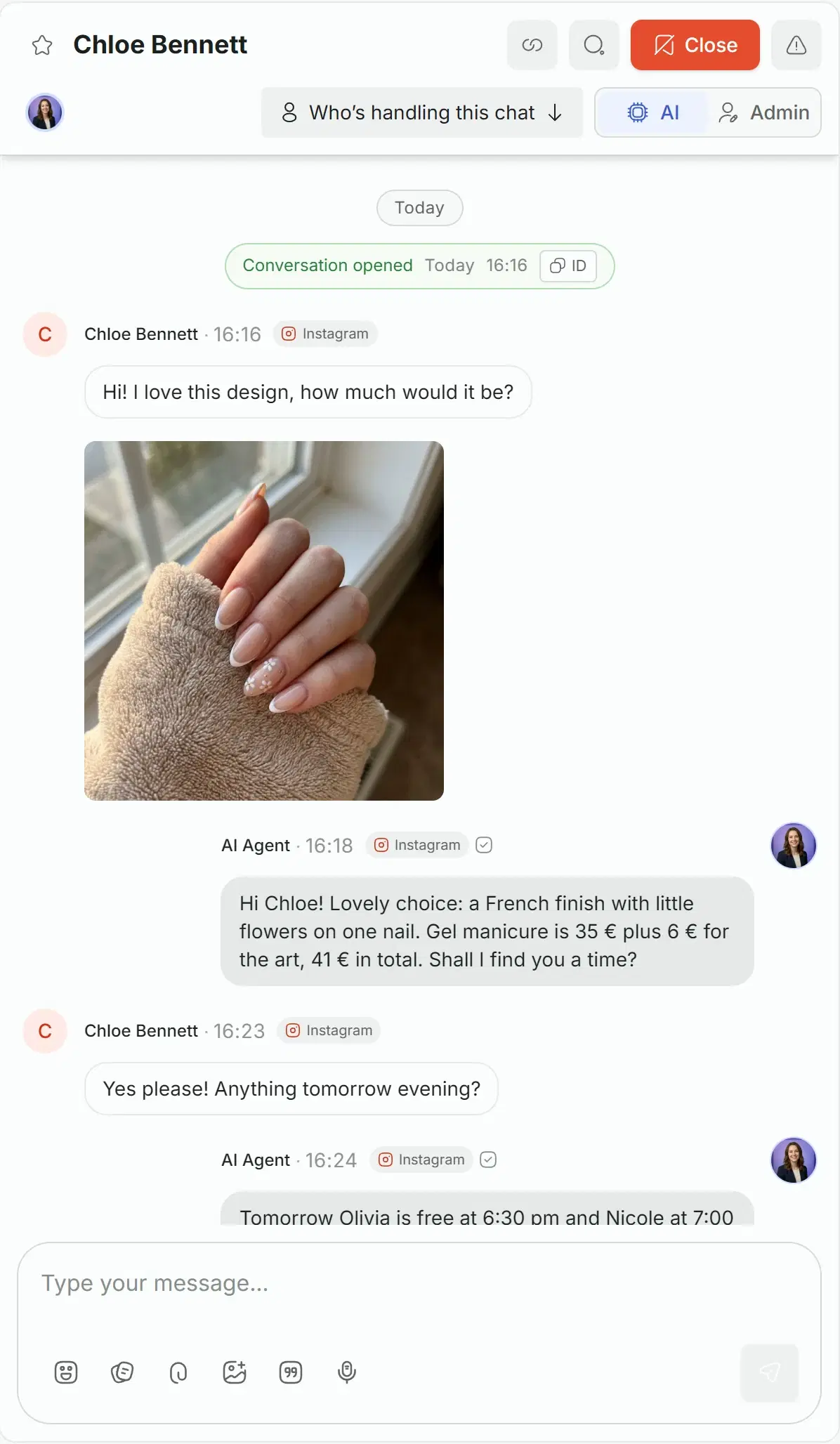
 Hi! I love this design, how much would it be?16:16
Booked: tomorrow, 18:30, gel manicure with nail art, Olivia
A photo of a nail design in the afternoon: Solwees names the service and the price and books the visit for the next evening. The same chat is in the inbox frame further down the page.
Two ways to connect Instagram
Directly with Instagram, or through the Facebook Page the account is linked to. You need an Instagram professional account; the rest is a sign-in and a few permissions.
Instagram directly
A quick sign-in to one Instagram account, with no Facebook needed.
Via Facebook
Sign in with Facebook and pick the Instagram accounts linked to your Facebook Pages.
Several accounts
Add another account for a second salon or a second brand. All of them land in the same inbox.
If access is revoked
The account shows Reconnect required, and one sign-in brings it back.
Settings › Channels
A quick sign-in to a single Instagram account, without Facebook.
What the assistant answers in Instagram
Direct messages, photos, voice messages, replies to your stories, shared posts and messages from your ads: everything lands in one chat and gets an answer.
The assistant looks at the picture a client sends and uses it in the answer: a design, a haircut, a screenshot of a price.
- It understands what is in the photo
- It matches it to your services and prices
- With several pictures in one message, it looks at the first
studio.demoStudio DemoHi! I love this design, how much would it be?16:16SolweesHi Chloe! Lovely choice: a French finish with little flowers on one nail. Gel manicure is €35 plus €6 for the art, €41 in total. Shall I find you a time?16:18A voice message is turned into text, and the assistant answers it like a typed one.
- The answer comes in text, in the same chat
- In the inbox the team hears the message and reads its text
When a client answers your story, the assistant sees what the story was about and replies in context.
- On by default
- Mentions of you in a client’s story come to the inbox, and the assistant answers them once you switch that on
- Hearts and reactions to stories are not answered
A client sends you a post: the assistant reads its caption and looks at the picture.
- A post comes with its caption and picture
- A reel comes with its caption and link
When a client writes from an ad, the assistant knows which ad it was and answers about it.
- Ads that open a chat and lead forms pass their details to the assistant
- Comments under ads are marked with the ad
Comments under posts and ads
Switch it on, and a comment does not get lost under the post: it comes to the inbox, gets a short public reply, and the assistant writes to the person in Direct.
Comments in the inbox
Each comment comes to the chats, marked as a comment on a post, so the team sees it.
An answer in Direct
The assistant writes to the commenter in Direct. Instagram allows one such message per comment, within 7 days.
A short public reply
You set the text that appears under the comment, or leave it empty.
Only the comments you want
List words like price or book, and the assistant answers only the comments that contain them.
studio.demo Spring French with flowers 🌸
chloe.bennett How much is this? 😍
2 min
studio.demo Sent you the details in Direct!
The public reply you set
Direct
Hi Chloe! This one is a gel manicure with nail art: €41 in total. Shall I find you a time?
You choose what the assistant answers
Each Instagram account has its own switches in Settings, Channels, Instagram. Flip them here to see what each one changes.
Story replies
On by default: the assistant answers when a client replies to your story.
Story mentions
Off by default. Switch it on, and the assistant answers when a client mentions you in a story.
Hours of its own
The assistant can work on a schedule of its own for Instagram.
Settings › Channels › Instagram
@studio.demo
Story replies
Reply to story replies
When a client replies to your story, the assistant answers with the story's context.
Reply to story mentions
When a client mentions you in their story, the assistant answers.
Post and ad comments
Save comments to chats
The comment appears in the chats, marked as a post comment.
Reply to comments
A short reply under the comment, and the answer in Direct.
Agent replies via direct message
One message in Direct per comment, within 7 days.
Public reply under the comment
Sent you the details in Direct!
Reply only to comments containing
price, how much, book
24 hours for the assistant, 7 days for the team
Instagram limits how long a business can answer after the client’s last message. Solwees keeps to it, so nothing you send is lost.
The assistant: 24 hours
The assistant and automatic messages, a reminder for example, reach the client within 24 hours of their last message.
Your team: 7 days
A teammate can still answer by hand for up to 7 days. The message goes out as a human agent reply.
The client writes first
A new chat starts when the client writes. After 7 days the chat waits for the client’s next message.
- The assistant and automatic messagesAnswers, reminders, follow-ups.
- Your teamReplies by hand, sent as a human agent reply.
- ClosedUntil the client writes again.
The team sees the same chat
This is the chat from the top of the page, in the Solwees inbox: the photo, the assistant’s answer, the price. Anyone on the team can step in.
Take over by typing
A teammate starts writing and the chat goes to a person. The assistant stays silent until the chat is handed back.
From the Instagram app too
If you answer in the Instagram app itself, Solwees saves it as the team’s reply, and the assistant steps back.
Photos, video, voice
The team sends images, video, audio, files and voice messages, and can react to a client’s message.
Quick replies and notes
Type a slash to insert a saved answer. Notes for the team stay inside Solwees.
Everything Instagram does in Solwees
The full list, group by group.
- Instagram directly, without Facebook
- Via Facebook, for accounts linked to Pages
- Several accounts in one workspace
- Back in one sign-in if access is revoked
- An Instagram professional account is needed
- Set up in the web dashboard
Before you start
Plan
Instagram is included in every plan. The plans are compared on the pricing page.
The account
An Instagram professional account. For the Facebook route, the account is linked to a Facebook Page.
Where to connect
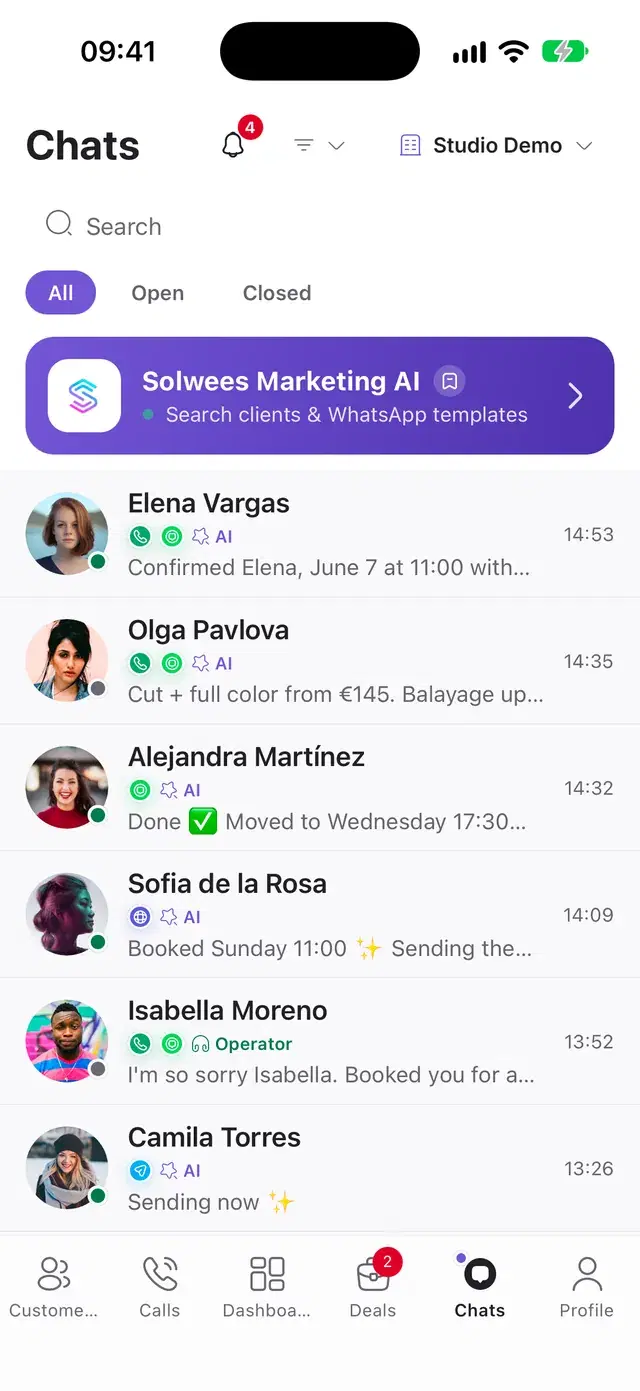
Instagram is connected in the web dashboard. The chats are answered in the dashboard and in the app.
Questions about Instagram
Can an AI receptionist answer Instagram DMs and book clients?
Yes. Solwees replies to direct messages on your Instagram professional account, answers questions about services and prices, checks free times in your booking system and makes the booking in the same chat. The supported booking systems are listed on the integrations page. The conversation is saved in the shared inbox next to WhatsApp, Telegram and calls, and your team can step in at any moment.
Does Solwees understand photos, story replies and comments on Instagram?
Photos, yes: Solwees looks at the picture a client sends and uses it in the answer. Replies to your stories are answered by default. Mentions of you in a client’s story are shown in the inbox and answered once you switch that on. Comments under posts and ads are off until you enable them in the Instagram channel settings; then the assistant answers the commenter in Direct.
How do I connect Instagram to Solwees?
In the web dashboard open Settings, Channels, Instagram and press Connect: with Instagram directly, or via Facebook for accounts linked to a Facebook Page. You need an Instagram professional account. Instagram is connected in the web dashboard, not in the mobile app.
Can Solwees message Instagram clients first?
Only those who have written to you, and only within 24 hours of their last message: this is Instagram’s rule for businesses. A reminder reaches a client on Instagram only if they wrote there in the last 24 hours; a teammate can still answer by hand for up to 7 days. Otherwise Solwees uses the order of channels you set, with WhatsApp first by default.
Can my team answer Instagram chats in Solwees?
Yes. Every Instagram chat is in the shared inbox next to WhatsApp, Telegram and calls. A teammate starts typing and the assistant steps back; a reply sent from the Instagram app is saved as the team’s too. The team sends photos, video, voice messages and files.
Can Solwees answer only comments with certain words?
Yes. In the Instagram settings switch on replies to comments and list the words, for example price or book. The assistant then answers only the comments that contain them: with the short public reply you set, if any, and with a message in Direct.
Let Solwees answer your Direct
Connect Instagram, choose what the assistant answers, and the next message from a story, a post or an ad gets an answer right away.