
See the bookings your chats and calls bring.
Solwees counts conversations, bookings and visits and sorts them into seven reports: money, conversations, bookings, channels, ads, customers and campaigns. The main figures stand next to the previous period of the same length, so you can tell growth from an ordinary week.
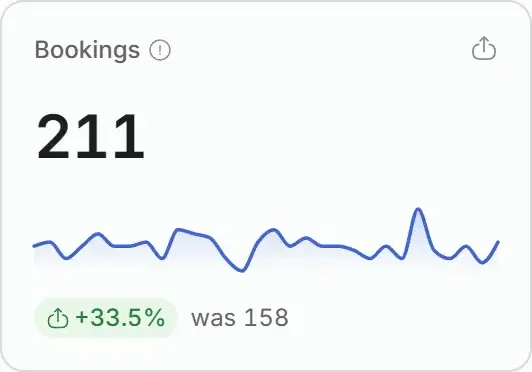
Bookings
211
+33.5%was 158
Aug 29Sep 27
Example figures of a demo salon, not a customer’s data. The switch works as in Reports: 7, 30 or 90 days, each next to the period before it.
Each report answers one question.
Open Reports and pick a tab. Here is what each one holds, on the data of the demo salon for 30 days.
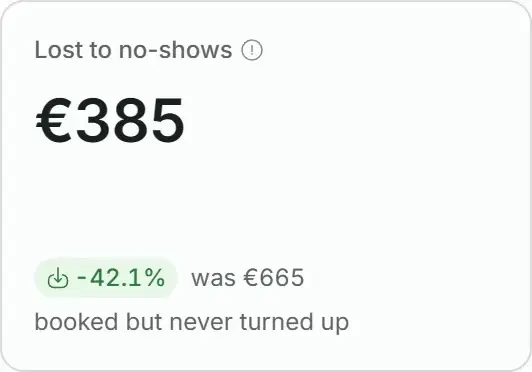
The tab opens with today: one line with the conversations, the bookings and their value since midnight, refreshed every minute. Then the period: the value of bookings made, the value of visits that took place and what no-shows cost.
- Under the line of today are the conversations that went wrong today: what happened in a line, and the time. They show whether anything needs doing right now. The Open button takes you to the chats.
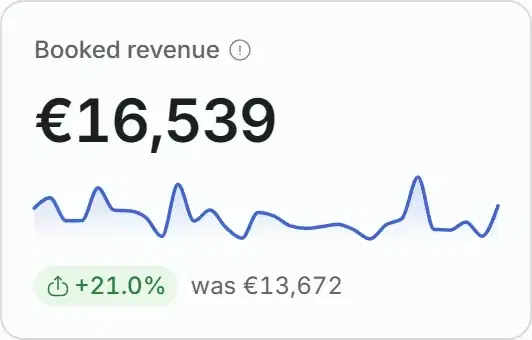
- Booked revenue is the value of bookings created in the period, cancelled ones excluded. It is not money received: reports do not count payments.
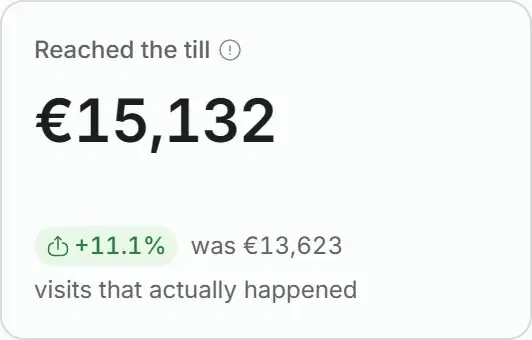
- Reached the till counts the visits your booking system marked as attended (or, without a booking system, visits whose time has passed).
Today
refreshes every minute
14 conversations, 8 bookings, €792 in revenue.
- Critical failure in a conversation11:18The client was told the booking was made, but it was not created.Open
- Customer left unhappy09:07Open
Booked revenue€16,539
Reached the tillvisits that actually happened€15,132
Lost to no-showsbooked but never turned up€385
How fast the first reply comes, how long a conversation takes, how often a person had to step in and in what mood clients left.
- Reply and closing times are medians, so one conversation left open for three days does not distort them.
- Handed to a human separates the cases where the assistant called a person from those where an admin took over.
- Needs attention lists the conversations of the period that went wrong, with a button to the chats.
Every booking has one of three outcomes: the client showed up, did not show up, or the visit is still ahead. A booking for the day after tomorrow is not counted as lost.
- The no-show rate is counted only from visits with a known outcome.
- Cancellations are split by who cancelled and by the reasons clients gave.
- Bookings made by the assistant and those your booking system sends to Solwees are counted together, and a separate figure shows how many the assistant created.
One table with WhatsApp, Instagram, Telegram, Viber, Facebook, the website widget and calls: conversations, bookings, conversion and the value of bookings for each channel.
- A list under the table shows which channels are connected and which are not: a channel with no conversations may simply not be connected.
- Filter by channel on the Money, Conversations, Bookings and Ads tabs.
- Reply speed per channel is not counted yet.
When a client writes from an Instagram, Facebook or WhatsApp ad that opens a chat, the conversation is tied to that ad. The table shows conversations, bookings, conversion and the value of bookings for each ad.
- Only paid traffic is here: clients who wrote on their own are not mixed in.
- Rows are grouped by the ad itself, so renaming an ad does not split its numbers into two rows.
- The campaign name stands under the ad. Until you give Solwees access to ad names, a row shows the ad number.
Clients who wrote in the period: new ones and those who had written before, the average value of a client, the usual gap between visits and two lists you can act on.
- Most valuable: clients by the total of their completed visits over all time.
- Long time no visit: clients who have gone more than twice their own usual interval without a visit.
- The Message button opens the chat with that client. Only clients with at least two visits get into this list.
The messages Solwees sent for you: reminders, confirmations, review requests and win-back campaigns. How many went out, how many were delivered and how many got a reply.
- Activity by day and the numbers of each campaign.
- This tab counts a week or a month: 7 days show a week, 30 and 90 days show a month.
Enquiries565100%
−155
Looked for a time41073%
−73
Offered a time33760%
−126
Booked21137%
−20
Booking still on19134%
−26
Showed up16529%
Demo salon, 30 days. The steps count enquiries. The Bookings report counts bookings, including the ones your team created, so its numbers differ.
From the first message to the visit
Six steps, each counted from facts: what the assistant did in the conversation and the bookings in your system. You see at which step clients fall away.
- Looked for a time: the assistant searched your schedule for the client.
- Booking still on: the booking is confirmed and was not cancelled.
- Showed up: your booking system marked the visit as attended (or, without a booking system, the time of the visit has passed).
- The percentage next to a step is its share of all enquiries, and the number between two steps is how many were lost there.
When clients write
A map of the week by the hour, in your business’s time zone. It answers a practical question: is it worth extending your hours or adding an evening shift.
Most messages come in on Thursday around 19:00: 11 conversations
At night and late in the evening: 12% of all conversations
An illustration, not measured data. In your report the map and the busiest hour are counted from your own conversations.
The busiest hour in words
Above the map the report names the day and the hour when the most enquiries arrive, with their count.
The share that comes at night
Below the map: how much of all enquiries arrives before 8:00 and from 21:00.
For the period you chose
The more intense a cell, the more enquiries came in that hour. Change the period and the map is counted again.
Summaries: what the assistant was missing
Numbers show that a conversation was lost. A summary shows why. Solwees rereads the conversations of a period that have been reviewed and puts on one page what the assistant was missing, where it went wrong and what to fix.
Summary for 30 days565 conversations · 211 bookings
Bookings are up by a third, and slightly more conversations end in a booking: 37.3% against 35.5%.
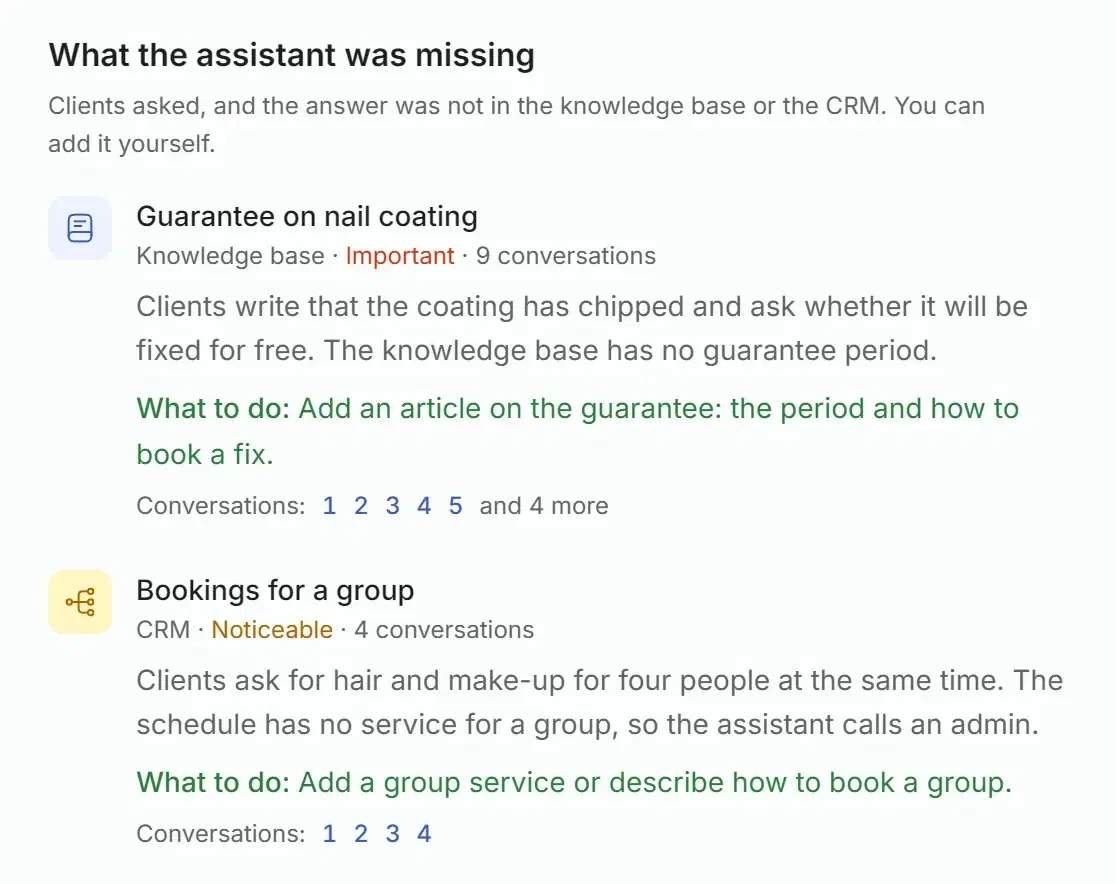
What the assistant was missing
Knowledge baseGuarantee on nail coating
Clients write that the coating has chipped and ask whether it will be fixed for free. The knowledge base has no guarantee period.
What to do: Add an article on the guarantee: the period and how to book a fix.
Conversations:12345
CRMBookings for a group
Clients ask for hair and make-up for four people at the same time. The schedule has no service for a group, so the assistant calls an admin.
What to do: Add a group service or describe how to book a group.
Conversations:1234
Building…Summary is ready
A sample summary for the demo salon.
- What the assistant was missing: questions that had no answer in the knowledge base or the CRM, with links to the conversations. You can add the answer yourself.
- Assistant mistakes: the data was there, but the answer was not right. These are on the Solwees side, not yours: send them to support.
- Conversation reviews: how many conversations were reviewed, in how many the client’s request was solved, partially solved or not solved, and the average score out of 10.
- Summaries are off until you switch them on. Then they are built on a schedule, from every day to every 30 days, in the morning for the completed days, or by a button for the current period. The text is written in English, Spanish, Russian, Ukrainian or Georgian, and a notification in the dashboard tells you when one is ready.
Time saved
98.2 h
98.2 h × €14=€1,375
The hours are from the demo report, where the rate is €14 an hour.
An estimate of time saved, in money at your rate
Solwees adds up how long the conversations handled without a person lasted, from the first message to the last, pauses between messages included. It is an estimate, not a stopwatch. Enter what an hour of your admin costs, and the report multiplies one by the other.
- While the rate is empty, the report shows hours only and does not make up an amount.
- The rate and the report currency are set in Settings, in the block Analytics and money.
Everything the reports count
How a figure in a report is read, and the full list, tab by tab.
In every report
- Period of 7, 30 or 90 days
- Main figures next to the previous period of the same length
- Shares compared in percentage points
- Filter by channel on the Money, Conversations, Bookings and Ads tabs
- Hints on how the figures are counted
- On a small sample most shares are shown as counts, not percentages
- Days counted in your business’s time zone
- Amounts in your currency, and different currencies are never added up
- A notice when the time zone or the currency is not set
- A link keeps the tab, the period and the filter
- Print or save as PDF, all tabs in one document
Money
Conversations
Bookings
Channels and ads
Customers
Campaigns
Summaries
Reports in your phone
The Dashboard tab of the Solwees app opens with today’s bookings and continues with the report: money, conversations, bookings, channels, customers and campaigns.
Dashboard
Today8 bookings today
- 14:30Evie WilsonManicure
- 16:00Zoe GarciaLash lift
- 17:30Rachel JohnsonColour
+5 more
Money
In 30 days: 211 bookings worth €16,539
+33.5%
211
Booked
+21.0%
€16,539
Booked value
Today’s bookings first
The time, the client and the service of the nearest bookings. One tap opens the full list.
Up to 12 months
In the app the period goes from 7 days to 12 months. In the web dashboard it is 7, 30 or 90 days.
Rate and currency at hand
The owner can change the report currency and the admin hourly rate right in the app.
Good to know
- Revenue in reports is counted from the value of bookings, not from payments. What clients actually paid is not counted.
- Whether a client showed up, the report learns from your booking system. If the system does not report an outcome, the visit stays under Still ahead, even after its date.
- Reports are not exported to a spreadsheet file yet. You can print a report or save it as PDF from the browser.
- A breakdown by service and by specialist is not shown yet.
- Customer sentiment, today’s alerts, topics and the list of what the assistant was missing appear after conversations are reviewed. If none was reviewed in the period, the block says so and does not guess.
- On the Conversations tab the lists of what the assistant was missing come in English for now. Summaries are written in the language you chose.
- Summaries and the Ads report are in the web dashboard only for now.
Questions about reports
Is the revenue in reports real money?
It is the value of bookings. Booked revenue adds up the bookings created in the period, without the cancelled ones. Reached the till adds up the visits your booking system marked as attended (or, without a booking system, visits whose time has passed). Reports do not count payments, so both figures show the value of visits, not cash received.
Which periods can I choose?
In the web dashboard: the last 7, 30 or 90 days. In the mobile app: from 7 days to 12 months. The main figures stand next to the previous period of the same length.
How does the report know that a client showed up?
From the booking system connected to Solwees: it marks a visit as attended or as a no-show. If you take bookings in Solwees without such a system, a visit counts as attended once its time has passed, so no-shows are not seen. A visit with no outcome yet stays under Still ahead and does not affect the no-show rate.
Can I export a report?
The Print / PDF button prints the report or saves it as PDF, and all tabs go into one document. Export to a spreadsheet file is not available yet.
How is time saved counted?
Solwees adds up how long the conversations handled without a person lasted, from the first message to the last, pauses between messages included. It is an estimate, not a stopwatch. To see it in money, enter the admin hourly rate in the settings. Without the rate the report shows hours only.
Do I need to set anything up?
Almost nothing. Conversations and bookings appear by themselves. Show-ups need a connected booking system. Three settings make the reports more precise: the time zone, the currency and the admin hourly rate. Summaries are switched on separately.
Look at your own numbers
Connect a channel and your booking system: the first conversations and bookings appear in Reports the same day.