
Solwees writes to your clients at the right moment.
Booking confirmations, day-before reminders, review requests, win-back notes. You switch campaigns on and write the texts; Solwees sends them and carries on the conversation.
Sophie Walker
Booked by phone: manicure, Saturday, 16:00
Mon
15:52
Mon 15:52Booking confirmedright after booking
Hello Sophie! Your booking for 2026-10-03 at 16:00 is confirmed. Address: Calle Aurora 14, Marbella. We look forward to seeing you!
Fri
09:20
Fri 09:20Visit reminderthe day before
Hi Sophie! A reminder of your appointment tomorrow at 16:00: Manicure. See you at Calle Aurora 14, Marbella.
- I will come
- I cannot
- Reschedule
I will come
Sat
18:40
Sat 18:40Visit ratingafter the visit
Hello! How was your visit? Please rate us from 1 to 5.
5
Thank you for the high rating! We would be grateful for a review on Google Maps: studiodemo.example/review
One booking, three messages.
Campaigns you switch on one by one
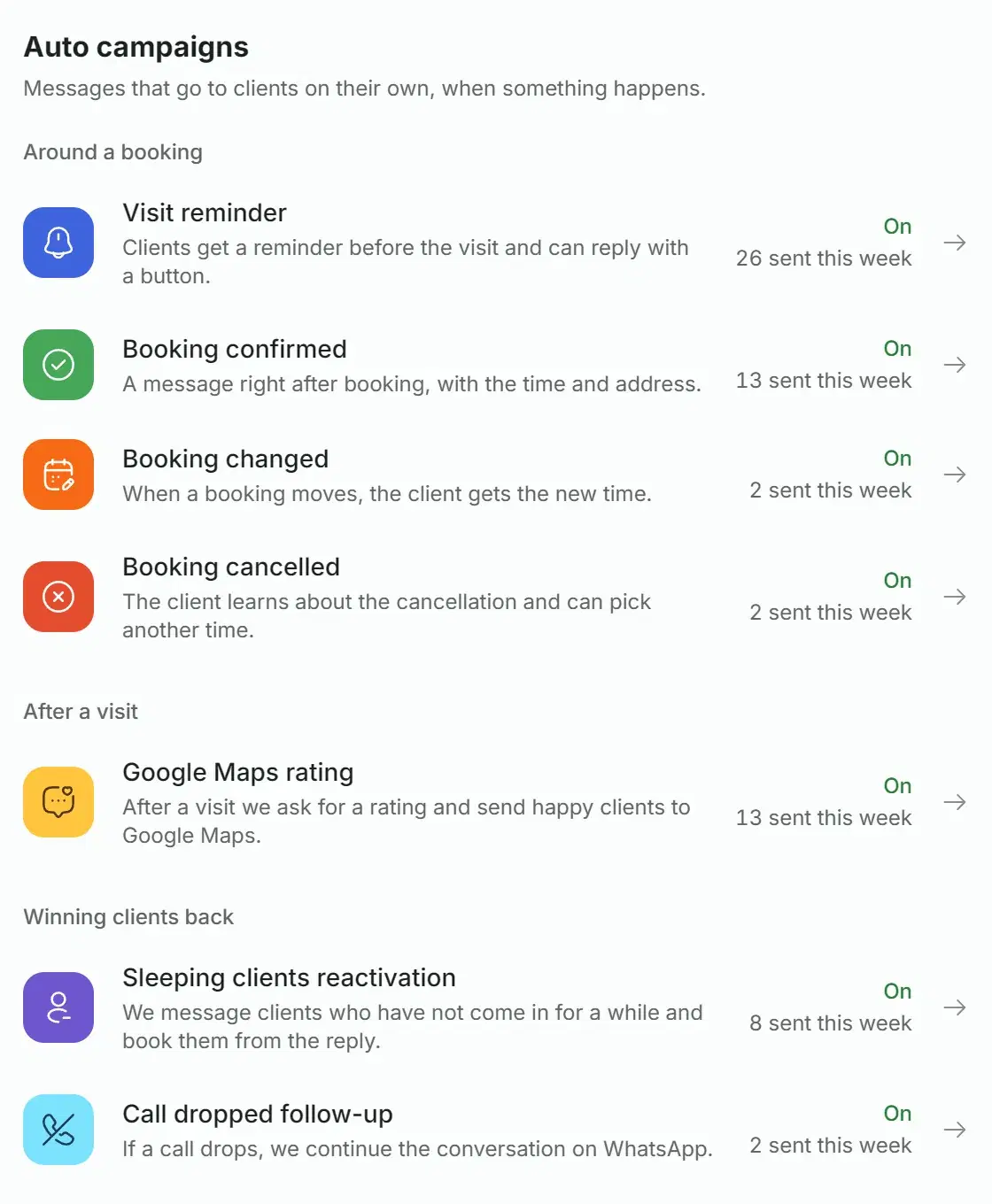
In the Marketing section every automatic campaign is turned on separately and has its own text. Until you turn one on, clients get nothing from it.
Auto campaignssent this week
- Visit reminderOn · 26
- Booking confirmedOn · 13
- Booking changedOn · 2
- Booking cancelledOn · 2
- Google Maps ratingOn · 13
- Sleeping clients reactivationOn · 8
- Call dropped follow-upOn · 2
The channel follows the client
Someone who has already chatted with you gets the message where that chat happened. Everyone else gets it in the channel order you set.
Quiet at night
Review requests, win-back messages and the message after a dropped call go out between 9:00 and 21:00 by your local time. So does the reminder, unless you set its hour yourself (7:00 to 22:00). Booking confirmations, changes and cancellations arrive at once.
A text for every language
Clients get the message in the language they wrote to you in. Someone who has never written gets your main language.
Variables instead of manual edits
The editor shows how the message will look and warns about a variable that will not be filled.
Hi {contact_name}! A reminder of your appointment tomorrow at {visit_time}: {service_name}. See you at {business_address}.
Hi Sophie! A reminder of your appointment tomorrow at 16:00: Manicure. See you at Calle Aurora 14, Marbella.
What the client gets
Four moments when a message goes out with nobody at the front desk involved.
The day before the visit the client gets a reminder with the time and the address. On WhatsApp through the official API it has three buttons under it, in English, Spanish or Russian; other languages get the English buttons. On WhatsApp by QR code you can add the reply options to the text as numbers.
- On WhatsApp Solwees understands a tapped button, a number and an answer in words like “I’ll be there” or “can we move it?”.
- The assistant sees a reschedule or a cancellation through in your booking system.
- The reminder is sent only while more than 24 hours remain before the visit, so keep the sending hour early in the day.
Send reminders before visit time
Campaign active
Hi Sophie! A reminder of your appointment tomorrow at 16:00: Manicure. See you at Calle Aurora 14, Marbella.
Thank you for confirming! See you soon.
The client gets a thank-you. Nothing changes in the booking.
- On WhatsApp Solwees understands a tapped button, a number and an answer in words like “I’ll be there” or “can we move it?”.
- The assistant sees a reschedule or a cancellation through in your booking system.
- The reminder is sent only while more than 24 hours remain before the visit, so keep the sending hour early in the day.
Three separate campaigns. The message goes out at once, as soon as a booking is created, moved or cancelled.
- After a booking by phone, or one made in your booking system if it reports new bookings to Solwees, the client gets a confirmation: when and where to come.
- If the assistant booked the client in a chat, no separate message is sent: it has already confirmed the booking there.
If a call that Solwees answered breaks off before the client has booked, Solwees writes to them on WhatsApp and offers to finish the booking in the chat.
- It is not sent if the client has written to you in a chat within the last half hour.
- It works on WhatsApp, and only in the languages you have written a text for.
Christmas, New Year or a holiday of your own. Set the date, the hour and the text, and once a year the greeting goes out by itself.
- To every client you can message on the chosen channel (WhatsApp or Telegram), or to one group.
- Each greeting shows up in the list of broadcasts with its result.
- On WhatsApp through the official API the template must be approved before the date, otherwise the greeting is skipped that year.
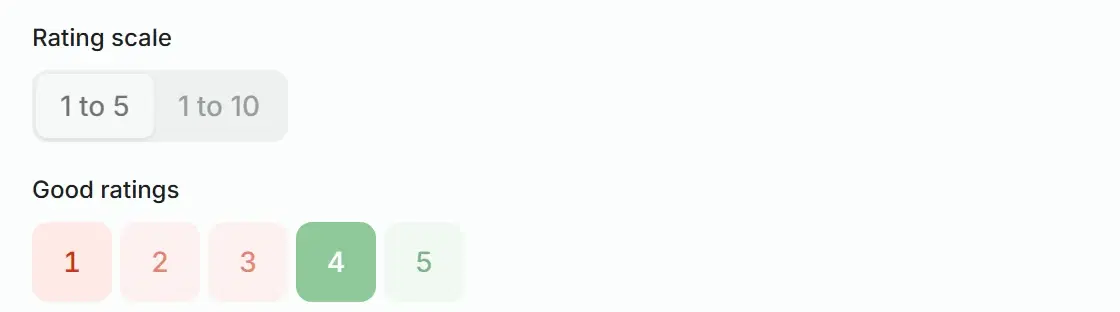
A scale of 1 to 5 or 1 to 10. Here good ratings start at 4; you move the line yourself.
Hello! How was your visit? Please rate us from 1 to 5.
Thank you for the high rating! We would be grateful for a review on Google Maps: studiodemo.example/review
A rating after the visit, then a review
One to three hours after the visit Solwees asks how it went. A happy client gets a link to leave a review. An unhappy one is asked what went wrong, and the manager hears about it.
- Three ways to ask: a rating and a reply to it, a review request straight away, or an open “how was your visit?” where Solwees reads the tone of the answer.
- If you prefer, after a low rating the chat is handed to the manager right away.
- There is one review link: in the product it is a field for a Google Maps link.
- A visit counts as attended when it is marked so in your booking system: without the mark no request is sent. If no booking system is connected, the visit counts once its time and the extra wait you set have passed.
Winning back clients who stopped coming
Solwees finds the clients who have not been in for a while and writes to them. When a client replies, the assistant takes the conversation: it finds a time and books them.
- You decide who counts as “sleeping”. By default it is 60 days without a visit. Those who have been away even longer get a different text.
- You can use each client’s own rhythm: someone who comes every two weeks gets the message sooner than someone who comes every two months. It needs at least three visits.
- VIP clients, by number of visits and average ticket, get their own text. If a phone number is connected in Solwees, you can have them called instead of messaged.
- You set how often one client can be messaged and how many messages go out until they come back. Those who already have a booking are skipped by default.
- Solwees does not add a discount to the message by itself: you write the offer into the text.
Find sleeping clients and message them
Campaign active
Tuesday, 10:32. Rebecca Lane has not been in for 74 days.
Hi Rebecca! We haven’t seen you at Studio Demo for a while. Until 31 October colour is 15% off. Shall I find you a time?
Perfect timing! Yes, my colour needs a refresh
Isabel is free on Thursday at 11:00 and on Saturday at 12:30. Which day suits you?
Saturday
You are booked for Saturday at 12:30: colour with Isabel, 72 € instead of 85 €. See you then!
Win-back over 30 days
16sent
11replied, 69%
The Campaigns tab of Reports shows how many messages went out and how many clients replied.
A broadcast to a client group
Three steps. Until you press Send, nobody gets anything.
A group keeps conditions, not a list. It is recounted every time, and new clients who match join it on their own.
- Conditions: services, time since the last visit, number of visits, amount spent, birthday, tags, conversation language.
- Own rhythm: clients who came regularly and missed their cycle.
- Exclusions: clients who already have a booking, and clients messaged recently.
- You can add or remove a client by hand.
- Visit history is made of the bookings that went through Solwees. Where your booking system supports it, past visits are loaded with the “Import from CRM” button on the Contacts page.
Colour in the last 6 months
80 clients in the base
Conditions
- Services: Single colour, Balayage and Airtouch27
- Had the service within 180 days18
- No upcoming booking13
80clients in the group
James Hall, Alice Davies, Isla White and 10 more
- Conditions: services, time since the last visit, number of visits, amount spent, birthday, tags, conversation language.
- Own rhythm: clients who came regularly and missed their cycle.
- Exclusions: clients who already have a booking, and clients messaged recently.
- You can add or remove a client by hand.
- Visit history is made of the bookings that went through Solwees. Where your booking system supports it, past visits are loaded with the “Import from CRM” button on the Contacts page.
For WhatsApp through the official API it is a template: you write the text, send it for review and wait for approval. For Telegram, and for WhatsApp connected by QR code, plain text is enough.
- Variables take the client’s name, their last service, or the same text for everyone.
- A template can carry an image, a video or a document, and buttons.
- The review status updates by itself. A rejected template can be edited and sent again.
- On Telegram only people who have written to your bot get the message.
The broadcast goes out in the background, during the daytime by your local time. The list of broadcasts shows how many messages were sent and how many clients replied within three days.
- The group is counted at launch: whoever has unsubscribed by then does not get the message. Add the “No upcoming booking” condition to skip those who have already booked.
- A broadcast that is still going can be stopped.
- For messages that did not go through, the reason is shown.
- You can also send a template to a few clients without a group: pick contacts or paste numbers.
Find clients who came for a manicure every month and disappeared, and prepare a campaign for them
Found 47 clients: they came for a manicure about once a month and have been away for more than 60 days. None of them has an upcoming booking.
Found 47 clients
Grace Turner, Hannah Reid, Zoe Clarke and 44 more
Save the group and prepare a text with no discount
The group “Manicure, away 60+ days” is saved. The template has been sent to WhatsApp for review. The draft is in Client groups: you can launch it there after approval.
Campaign draft: Manicure, away 60+ days
47 recipients · WhatsApp
The template is still in review. You can launch it after approval.
A marketing assistant that knows your client base
The Marketing section has a chat with a marketing assistant, named Solwees Marketing AI in the interface. Describe the task in your own words: it finds the clients in your database, builds a group, prepares a template and a broadcast draft. You launch it.
- It counts from the visit history Solwees has: who came for which services, at what rhythm, and who disappeared. If there is no history yet, it says so.
- For WhatsApp through the official API it writes a template and sends it for review. For WhatsApp by QR code and Telegram it prepares plain text.
- It shows the results of past broadcasts and automatic campaigns.
- It works in the web version. It is not in the mobile app yet.
Promotions the assistant quotes with the price
Promotions is its own section next to Marketing: there you set a promotion, its dates and its prices. In salons and barbershops, when a client asks the price of a service the promotion covers, the assistant gives the promo price, the regular one and the last day. In chats and on calls.
- A promotion has a name, terms for the client, start and end dates and a switch. Without dates it runs until you turn it off.
- A promo price is set on a service: as a percentage or as a fixed price. You can set it for a whole category at once.
- The assistant does not work out the discount itself: it receives a ready price.
- Asked “what offers do you have?”, the assistant lists the ones in effect.
Autumn colour refresh
Promotion enabled · until 31 October
15% off all colour services until 31 October.
Hello! How much is a single colour?
Hello! With our “Autumn colour refresh” offer it is 72 € instead of 85 €, until 31 October. Shall I find you a time?
Yes, Saturday would be good
Isabel is free on Saturday at 15:00. Shall I book you in?
- Balayage and Airtouch150 €128 €−15%
- Single colour85 €72 €−15%
- Women's haircut40 €
- Keratin smoothing120 €
Promo prices are set in the service table
- When the dates run out or you switch a promotion off, the assistant stops quoting it within about a quarter of an hour. A call already in progress keeps the prices it started with.
- The first-visit discount and packages are set up in the same place. In chats the assistant quotes them; on calls it does not offer the first-visit price yet.
- Base prices come from your booking system if Solwees can load its service catalogue. They are refreshed when you sync the catalogue.
Everything in Marketing and Promotions
Auto campaigns
Texts and delivery
Client groups
Broadcasts and templates
Marketing assistant
Promotions
Good to know before you start
Where a message goes
- The client has already written to you on TelegramTelegramwhere the chat happened
- The client has not written yet, but you have their numberWhatsAppthe first channel in your order
- WhatsApp is not connected, and the client has never written to you on TelegramNot sentnobody can be messaged first on Telegram
You set the channel order for new clients. On Telegram, Instagram and Facebook you can only message someone who has already written to you there.
Number quality
For a number on the official API Solwees shows its quality rating. While it is below green, campaign messages and broadcasts are not sent, and replies to clients keep working. A number connected by QR code has no such rating: send its broadcasts to small groups, a large one raises the risk that WhatsApp blocks the number.
The reminder: the day before, from a booking system
The reminder goes out the day before, only while more than 24 hours remain before the visit, and only for a booking that is in a connected booking system. A reminder a couple of hours before the visit is not available yet.
Dates in messages
For now a date in a message is printed as 2026-10-03, and the time in the 24-hour format.
Questions and answers
Do I need the WhatsApp Business API for this?
Not necessarily. Messages go out through the channel you have connected: WhatsApp through the official API, WhatsApp by QR code, or Telegram. With the official API the first message to a client must be an approved template, so campaign texts go through WhatsApp’s review.
Will Solwees send anything without my say?
No. Automatic campaigns are off until you turn them on, and they send the text you saved. A group broadcast is launched by you with a button. The marketing assistant prepares a draft but never writes to clients itself.
In which language will the client get the message?
In the language they wrote to you in. Someone who has never written gets your main language. You write a text for every language you need; if the right one is missing, the client gets English, and without it the first language in the list.
What happens if the client replies to a message?
The reply lands in the Inbox, in the chat with that client. The assistant answers replies to a reminder or a win-back message: it confirms the visit, moves the booking or finds a time. A reply to the rating question is handled by the campaign itself: after a good rating the client gets the review link, after a low one they are asked what went wrong and the manager is notified.
Can a client opt out of the messages?
Yes. Replying “stop” or “unsubscribe” is enough: the client goes on the stop list, and group broadcasts skip them.
How much does it cost?
The whole Marketing section is open during the free trial. After it Marketing is a paid module on top of your plan, and its prices are on the pricing page. On the official WhatsApp API, WhatsApp bills your company directly for template messages and, since October 2026, for replies above the first 1,000 a month per number; Solwees adds nothing on top.
Switch on your first campaign.
Start with the visit reminder: connect your booking system, turn the switch on and write one text.