
A chat on your website that takes bookings.
One script tag adds a chat to your site. Solwees answers in it the way it does in your messengers: it tells visitors about services and prices, finds a time and books them in. Every conversation lands in the same inbox.
Nails, brows and skincare
A salon in the centre of Marbella
- Gel manicure35 €
- Brow shape and tint20 €
- Hydrating facial75 €
Hi! I’m Lina from Studio Demo. How can I help?
Hi! Can I get a gel manicure on Friday?
Yes, Olivia is free on Friday at 12:30 pm and at 5:00 pm. A gel manicure is 35 €. Which time suits you?
Powered by Solwees
Site visitor
Solwees is answering
Website chatYes, Olivia is free on Friday at 12:30 pm and at 5:00 pm. A gel manicure is 35 €. Which time suits you?
An example: the site of a made-up salon. The chat on it is the Solwees widget. Under the site is the same conversation the way your team sees it.
Installed with one script tag.
Copy the code in the dashboard and paste it into the HTML of your site, just before the closing body tag. That is the whole installation.
<script id="ai-support-widget-script" src="https://app.solwees.ai/support-widget?Take the code
Settings, Channels, Messenger. The code is on the Install tab, with the Copy code button.
Choose who answers
Change it without touching the site
It looks like part of your site.
Take a ready style or set your own colours and logo. Try it here: the widget changes the way it does in the settings.
- Four styles: Default for your own colours and three ready ones, for restaurants, beauty salons and customer support.
- In the Default style you set the main colour, the background (one colour, a gradient or a picture) and a light or dark theme, or let it follow the visitor’s system.
- Your logo is shown on the home screen of the widget and on the round button that opens it.
- The button sits in the left or the right corner, with the distance from the edges set in pixels.
Style
Button
Studio Demo
Hi! I’m Lina from Studio Demo. How can I help?
Powered by Solwees
Languages of the widget
Studio Demo
Hi! I’m Lina from Beauty Lab. How can I help?
Powered by Solwees
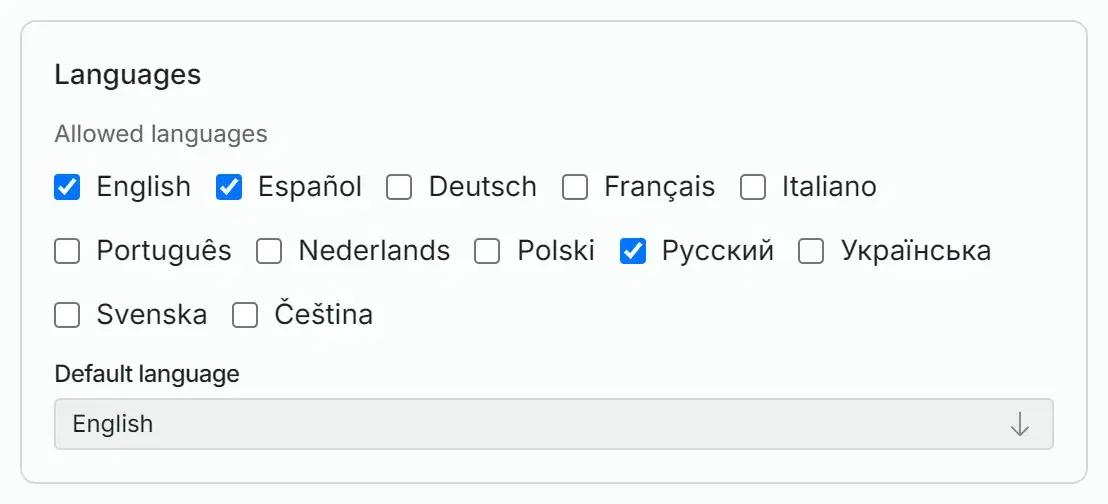
It speaks the visitor’s language.
The widget’s own buttons and labels come in 12 languages. Tick the ones your clients speak: the widget opens in the language of the visitor’s browser, and the assistant replies in the language of the message.
- You write the greeting separately for each language.
- If the browser’s language is not on your list, the default language is used.
- With more than one language on the list, the visitor can switch it in the widget, and the widget remembers the choice.
- The greeting counts as the assistant’s first line, so it does not say hello twice.
On a phone the chat opens full screen.
On a narrow screen the chat takes the whole display and the page behind it stops scrolling.
- A message can be dictated: the microphone turns speech into text in browsers that support it.
- Links in the replies can be tapped.
- The widget stays open when the visitor goes to another page of your site, and the conversation is one tap away.
- On a computer it is a panel in the corner of the screen, and Esc closes it.
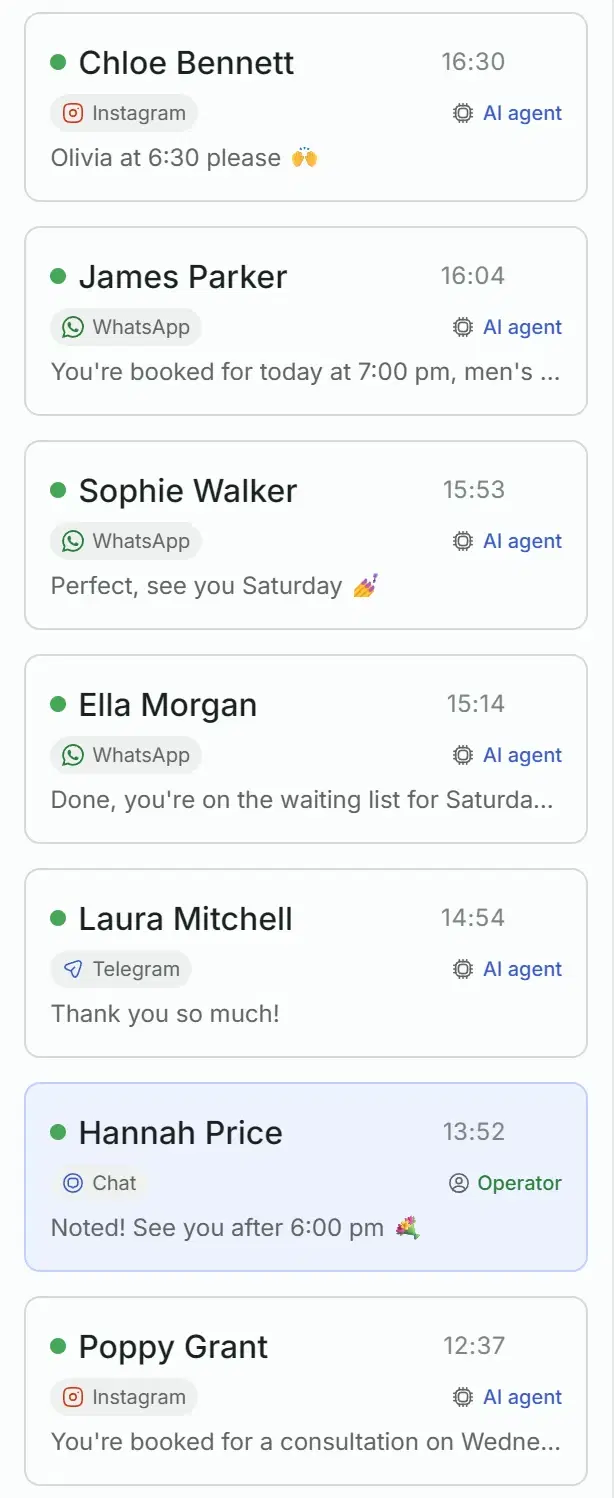
Site chats sit in the same list as your messengers.
A conversation from the site looks like any other in the Solwees inbox: you see its channel, who is handling it and everything the client wrote.
- Filter the list by channel to see only the chats from the site.
- The page the visitor wrote from is saved with the conversation.
- When a visitor gives a phone number for a booking, the chat joins the card of the client with that number, next to their WhatsApp history.
- A returning visitor is recognised by their browser: the widget shows their last conversation, and the assistant knows what was discussed.
- A new chat sends a notification to the dashboard and to the mobile app.
When a person is needed.
If a request is beyond the assistant’s rules, it calls your team. The notification says who is asking and why, with a short summary, so nobody has to read the whole thread.
- The team gets a notification in the dashboard and the mobile app, and in Telegram if you have set that up. When the visitor insists on a person, the chat is also marked as assigned to an administrator.
- The notification gives the reason and, when the assistant wrote one, a short summary. The visitor’s name and number are in it when they are known.
- A deal or a task can be created right from the chat.
A reply your team writes from the inbox is not delivered to the widget yet. For requests that need a person, give the assistant a rule to ask for a phone number, and continue by phone or in a messenger.
Good to know
Working hours
By default the assistant answers in the site chat around the clock. If you limit its hours, for all channels or for this one, a visitor who writes outside them gets no reply and no explanation, and a new visitor’s message does not reach your inbox. For a website it is better to leave the assistant on.
Your plan
Text only
After the visitor leaves
What stays in the browser
The Solwees line
The News section
Twelve interface languages
Everything in the website chat
The full list, by section.
Studio Demo
Nails, brows and skincare
A salon in the centre of Marbella
Hello! Can I tell you about our services or book you in?
Studio Demo
Hi! I’m Lina from Studio Demo. How can I help?

Gift cards
Powered by Solwees
- Studio Demo1:29 pmI’m passing this to Emma at reception, she will call you.
Powered by Solwees
Installation
- One script tag before the closing body tag
- The code and a copy button on the Install tab
- The assistant is chosen for each code
- Settings apply without changing the code
- The page of the conversation is saved
Design
Texts
Languages
For the visitor
For your team
Questions and answers
How do I add the chat to my website?
Copy the code on the Install tab (Settings, Channels, Messenger) and paste it into the HTML of your site before the closing body tag. It is one script tag. If your site builder has a field for code before the closing body tag (often called footer code), the tag goes there.
Can it book a visitor, or does it only answer questions?
It books. The site chat is run by the same assistant as your messengers, with the same services, prices, rules and the same connection to your booking system. Before it books, the assistant asks for the visitor’s name and phone number.
What languages does it work in?
The widget’s own interface comes in 12 languages: English, Spanish, German, French, Italian, Portuguese, Dutch, Polish, Russian, Ukrainian, Swedish and Czech. You choose which of them are allowed and which is the default. The assistant replies in the language the visitor writes in.
Can my administrator answer in the site chat instead of the assistant?
Not yet. An administrator sees every site chat in the inbox and gets a notification when the assistant calls for a person, but a reply written from the inbox is not delivered to the widget. Continue such conversations by phone or in a messenger: the assistant asks the visitor for a number.
Will a visitor see the chat again when they come back?
Yes, in the same browser. The widget keeps the last conversation and shows it again. Solwees recognises the visitor, so for your team it is the same client, and the assistant knows what was discussed. In another browser the visitor starts from scratch.
Is the website chat included in my plan?
The widget itself is available on every plan. The assistant answers in it, so it needs a plan that includes the assistant: without it nobody replies to the visitor in the widget. New chats count towards the limits of the plan, and on the free trial the number of site chats is limited. The plans and their limits are on the pricing page.
Add the chat to your site.
Sign up, set up the assistant and copy the code from the Install tab.