
Solwees calls your list for you.
Upload the contacts, write the task for the call and set the hours. Solwees phones each person, holds the conversation the way you described it and saves every answered call in your chats with a transcript.
Outbound call
Marina Cole
+34 612 300 870
0:00
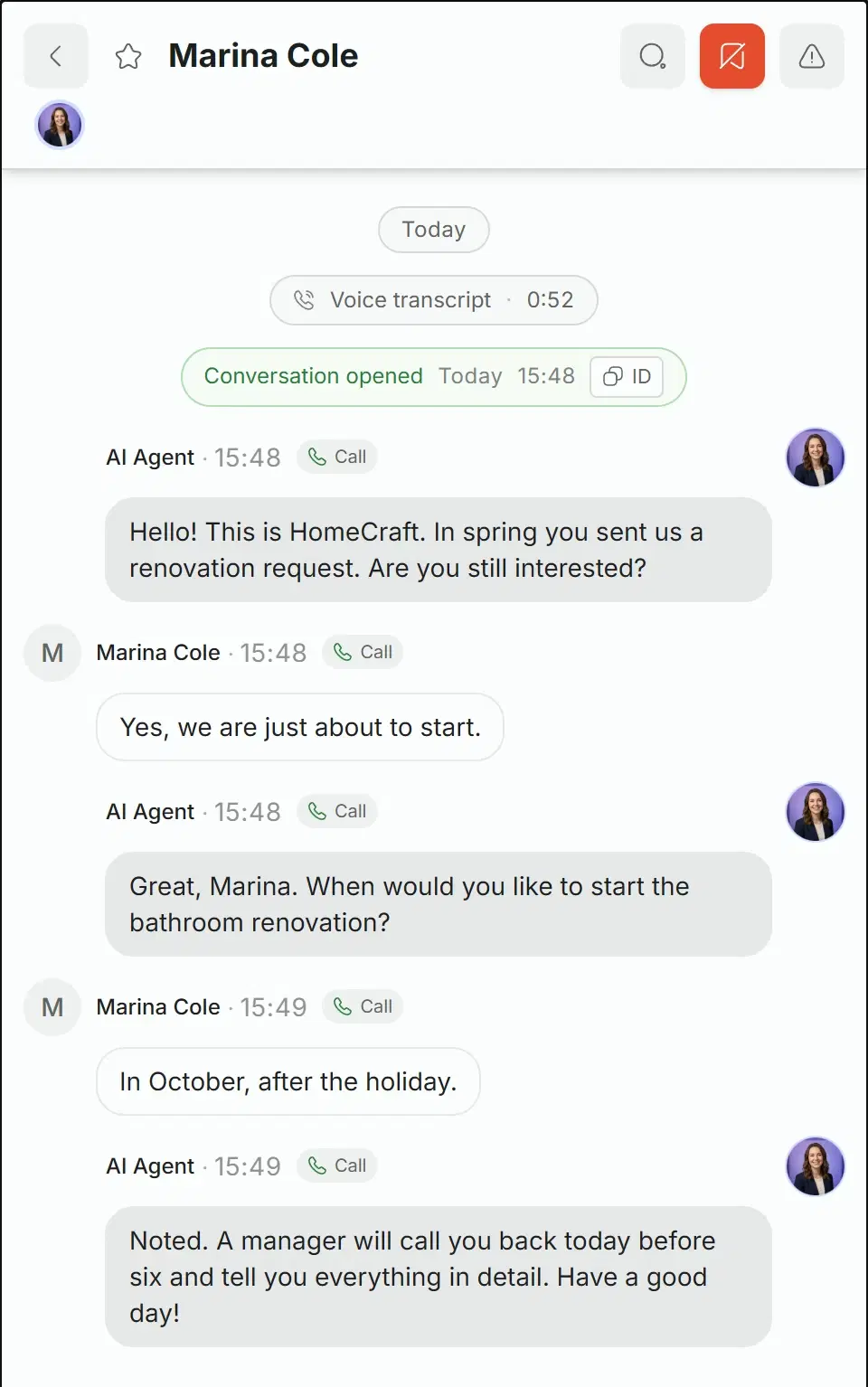
Hello! This is HomeCraft. In spring you sent us a renovation request. Are you still interested?
Yes, we are just about to start.
Great, Marina. When would you like to start the bathroom renovation?
In October, after the holiday.
Noted. A manager will call you back today before six and tell you everything in detail. Have a good day!
0:52Saved in chats with a transcript
A call on the task shown below: two questions, and the transcript waits for your manager in the chats.
Three steps and one button.
A campaign is a list, a schedule and a task. Nothing is dialled until you press Launch.
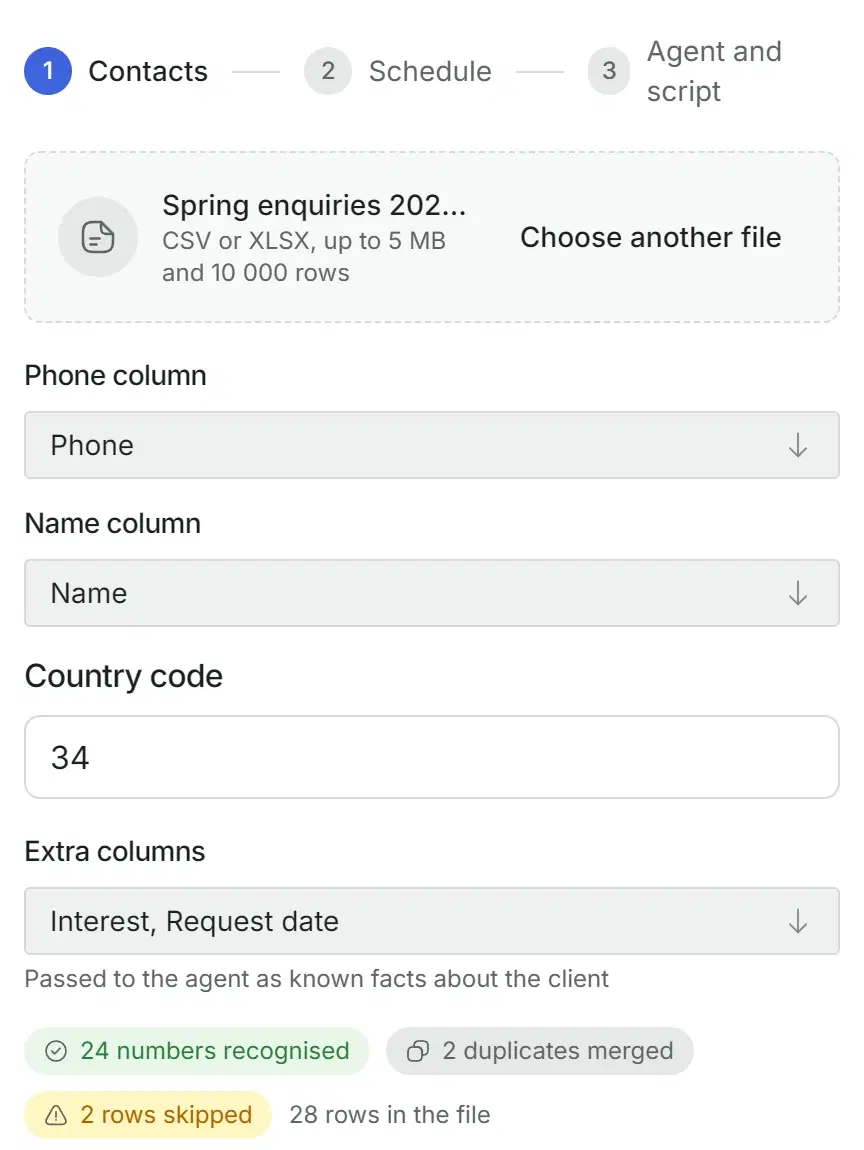
A CSV or XLSX file, up to 10,000 rows. Choose the columns with the phone and the name, and Solwees shows what it found before anything is created.
- Recognised numbers, merged duplicates and skipped rows are counted right away.
- Local numbers get the country code you set.
- Extra columns, such as what the person asked about, go to the assistant as known facts.
- More numbers can be added later, one by one or as a pasted list.
Calls go out only inside the windows you set, in the time zone of the campaign. Contacts are called one after another at the pace you set, starting from launch.
- One or several calling windows a day.
- The pace in calls per hour, 30 by default.
- Up to 10 attempts per person, with the pauses you choose.
- A limit in hours after which Solwees stops trying.
Pick the assistant that will make the calls and tell it what this campaign is for. The task is added to what the assistant already knows about your business.
- The first phrase is spoken word for word.
- The goal and the instructions: what to find out, what to offer, how to end the call.
- The language of the call.
- Titles of the materials you already sent: the assistant can refer to them.
The campaign is saved as a draft first. After Launch every contact gets its time, and you can pause the campaign at any moment.
- Call a queued contact right now, if the campaign is running and a window is open.
- Call the same person again.
- Change the first phrase, the goal, the instructions and the materials while the campaign is running.
Calls only in your hours, with retries
Before each call Solwees checks the window again. If nobody picks up or the line is busy, it tries later.
Day 1
Day 2
Calling window, 10:00 to 19:00
- 111:20. No answer.
- 217:20, six hours later. No answer again.
- 3Twelve hours later it is 05:20, outside the window. The call moves to 10:00, and the person picks up.
An even pace
At 30 calls an hour a call starts every two minutes. At launch each contact gets its time, and when a window ends the queue moves to the next one.
A second and a third attempt
No answer or busy: the next attempt comes no sooner than the pause you set, for example 6 hours and then 12, and only inside a window.
When the attempts stop
After the last attempt, or once the hours you set have passed since the first one, the person is not called again.
Pause in one click
A paused campaign starts no new calls. Calls already in progress finish normally.
The task of the campaign
Find out whether the renovation is still planned. No more than two questions.
From your file
Marina Cole · Bathroom renovation · 12.03.2026
From the chats
Could you send me the price list for a bathroom?
Already sent
Bathroom and kitchen price list.pdf
Great, Marina. When would you like to start the bathroom renovation?
What the assistant knows when it calls
It is the same assistant that answers your chats, with one more task.
- Your business: services, prices, rules and the knowledge base.
- The task of this campaign. Its instructions outweigh the general ones.
- Facts from your file: what the person asked about, when, anything that is in the columns.
- Your latest conversation with this person, found by the phone number.
- Titles of the materials you already sent.
Every answered call lands in your chats
An answered call appears in your chats as a separate conversation with a transcript. If the number matches a contact you already have, for example from WhatsApp, it lands in the same contact card.
- Read who said what, line by line.
- Call the person back yourself, or queue one more call in the campaign.
- Create a deal or a task right on that screen.
- All calls are gathered under Calls in the chat filters.
What you see for each contact
- Waiting
- Calling
- Connected
- No answer
- Busy
- Missed
- Cancelled
Calls Solwees starts on its own
Besides list campaigns, a call can be started by an event. Two examples.
A call after a sent offer
When the sales assistant has sent the client a file with an offer and the client goes silent, it can call after the delay you set, inside the calling windows from its settings. The client’s phone number must be known. If the client writes back first, the call is cancelled.
Offer for the kitchen.pdf
2 hours without a reply
A call to a client who stopped coming
In the campaign that brings back clients who have not visited for a long time, the most valuable ones can get a call instead of a message. If the call cannot be placed, the message is sent instead.
A valued client has not come for a long time
The call could not be placed
Marina, we have not seen you for a while. Shall I find a time for you?
Incoming call
+34 951 000 123
Before the first campaign
Which number people see
Calls go out through your own telephony if you connected it, otherwise from the phone number connected to your workspace. Connect one of them before the first campaign.
What it costs
Outbound calls use the same voice minutes as incoming ones. The minutes come with the plans that include calls, and extra minutes are sold in packs.
A rehearsal
In the assistant’s test panel you can run a simulated outbound call with the task of a campaign and hear how the conversation goes. No number is dialled, and the rehearsal uses voice minutes.
Good to know
- You prepare the list yourself. Call only people who agreed to hear from you, and take out those who asked not to be called: Solwees keeps no stop list for campaigns.
- Write both the first phrase and the instructions. Without them the assistant opens and leads the call in its own words.
- The windows are the same on every day of the week.
- If an answering machine picks up, the call is marked Connected, the assistant speaks to it, and this contact is not tried again.
- Who is worth calling back you decide from the transcripts. Results are not exported to a file yet.
- The schedule, the pace and the language are set when the campaign is created. Later only the task can be changed.
For any list where a second call is worth it
Old enquiries, quotes without an answer, clients who have not come back.
A first phrase for this list
Hello! In March you asked us about a viewing. Are you still looking for a flat?
Questions about outbound calls
What if the person does not pick up?
Solwees tries again. By default there are three attempts: the second no sooner than 6 hours later, the third no sooner than 12 hours after that, each in the nearest calling window, and nothing after 48 hours from the first call. You set all of this when you create the campaign.
Can it call at night or on a day off?
Only inside the windows you set, in the time zone of the campaign. The windows are the same on every day of the week.
How many people fit into one campaign?
Up to 10,000 rows in a file. More people can be added later, up to 500 at a time.
In which language does it call?
In the language you choose for the campaign. Choose it explicitly and write the first phrase in the same language.
Can I hear it before the launch?
Yes. In the assistant’s test panel choose the campaign and start a simulated outbound call. It runs in the browser with the same task, no phone number is dialled, and it uses voice minutes.
Can I stop a campaign that is already running?
Yes. Pause stops new calls at once, and the same Launch button continues the campaign.
Give Solwees your list.
Setting up the first campaign takes a few minutes: a file, the hours and the task.