
SMS that arrive under your salon’s name.
Solwees sends booking confirmations, reminders, a thank-you after the visit and payment links by text message, and alerts your manager when a client needs a person. Clients see your salon’s name instead of a number, and every SMS has its delivery status.
Text Message
Mon 15:52
Hello, Sophie! Your booking is confirmed for 17.10 at 16:00. Specialist: Anna Services: Manicure
Fri 16:00
Hello, Sophie! A reminder of your visit on 17.10 at 16:00. Specialist: Anna Services: Manicure See you soon!
Sat 18:30
Hello, Sophie! Thank you for your visit today. We would love to hear how it went.
This sender does not accept replies
What a client of the demo salon gets by SMS: the confirmation, a reminder before the visit and a thank-you after it.
What goes out by SMS
Five messages, each at its moment. They come from your salon’s name, and each one is in the history with the reason it was sent.
When a booking is made, the client gets the date, the time, the specialist and the services.
- The text is your own template
- Your salon’s name as the sender
STStudioDemoText Message
Mon 15:52
Hello, Sophie! Your booking is confirmed for 17.10 at 16:00. Specialist: Anna Services: Manicure
This sender does not accept replies
Before the visit the client gets a reminder with the time, the specialist and the services.
- One reminder per booking, never twice
- A cancelled booking gets no reminder
A few hours after the visit Solwees thanks the client and asks how it went.
- Sent once per visit
- Only for visits that took place
When a booking taken by phone needs a deposit, the payment link comes by SMS, and the confirmation follows once it is paid.
- The amount is in the message
- The confirmation SMS comes after the payment
When a client needs a person, the manager gets an SMS with the channel, the client’s number and the reason.
- It says where to answer: a call or a chat
- To the manager’s phone from the agent settings
Your salon’s name instead of a number
Set a sender name once, up to 11 Latin letters and digits. While the operator registers it, messages come from a shared name, and then from yours.
One name for every SMS
Confirmations, reminders and payment links all come from it.
Its status in the dashboard
Active, on registration or not set: you always know which name the client sees.
Settings › Channels › SMS
Sender name
On registrationSender name
StudioDemo10/11
Latin letters and digits only, up to 11 characters
We are registering the name with the SMS operator. Until then messages come from “Solwees”.
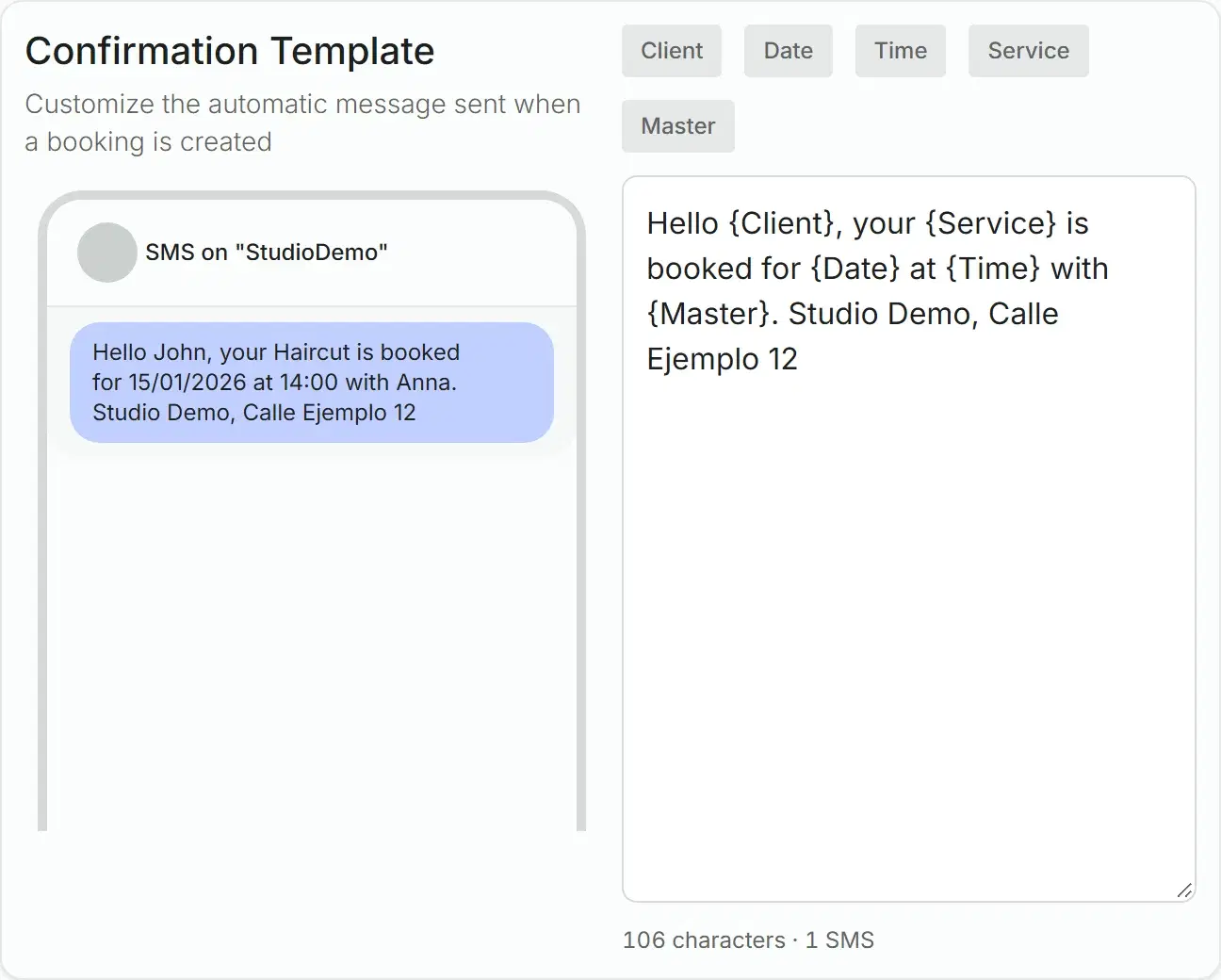
The confirmation, in your words
Write the confirmation text yourself. Variables put in the client’s name, the service, the date, the time and the specialist, and the phone beside it shows the message as it will arrive.
Five variables
Client, service, date, time and specialist: click one to put it in the text.
Characters and parts
The counter shows the length and how many SMS parts the message takes.
Live preview
The phone beside the text shows the message with sample data while you type.
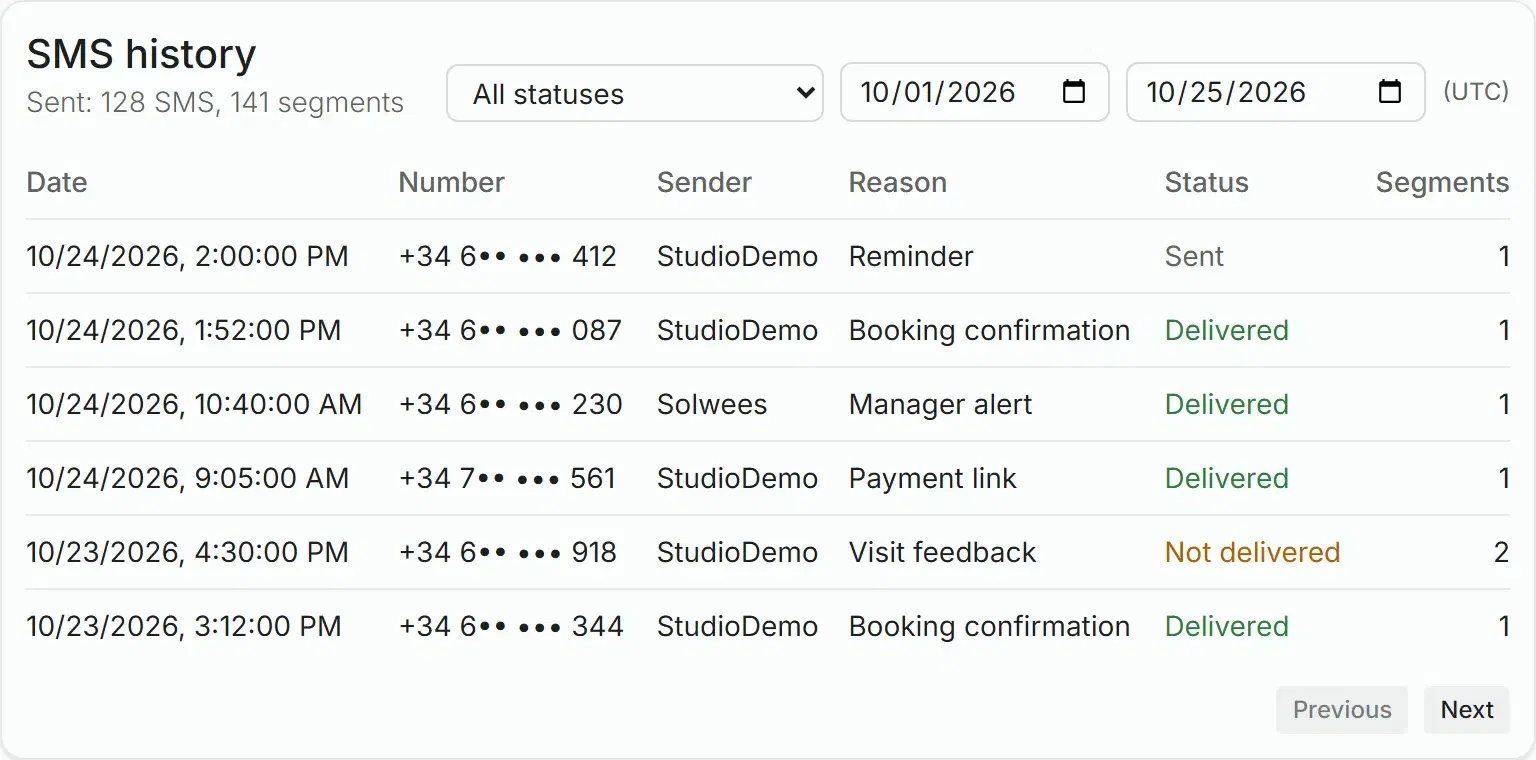
Every SMS with its status
The SMS history shows each message: when it went, to which number, why it was sent and whether it was delivered.
Delivery status
Queued, sent, delivered or not delivered, as the operator reports it.
The reason for each SMS
Confirmation, reminder, thank-you, payment link or manager alert.
Totals for a period
Pick the dates and filter by status: the totals count messages and parts.
Everything SMS does in Solwees
The full list, group by group.
- Booking confirmation
- Reminder before the visit
- A thank-you after the visit
- Payment link for a deposit
- Confirmation after the payment
- Alert to the manager
StudioDemo
Hello, Sophie! Your booking is confirmed for 17.10 at 16:00. Specialist: Anna Services: Manicure
Before you start
Countries
SMS go to the countries where Solwees has an operator. The SMS settings list them.
Sender name
The operator registers your name first. Until then messages come from a shared name.
Where to set it up
In the web dashboard, in Settings, Channels, SMS.
Questions about SMS
Can Solwees send SMS booking confirmations and reminders?
Yes. Solwees sends a confirmation when a booking is made, a reminder before the visit and a thank-you after it, from your salon’s name. Every SMS is in the history with its delivery status.
Will clients see my salon’s name?
Yes. Set a sender name of up to 11 Latin letters and digits in the SMS settings. Once the operator has registered it, clients see it instead of a phone number.
Can clients reply to the SMS?
Not to a message sent from a name: replies to such a sender are not delivered. Put your phone or a link to your WhatsApp in the text, and the conversation continues there.
How do I know whether an SMS was delivered?
Open the SMS history: every message shows its status, sent, delivered or not delivered, with the reason it was sent and the number of parts.
Which countries can I send SMS to?
The countries where Solwees has an SMS operator. The SMS settings list them; a number elsewhere is not sent to, and the history says why.
Can my manager get an SMS when a client needs a person?
Yes. Add the manager’s phone in the agent settings: when a conversation needs a person, the manager gets an SMS with the channel, the client’s number and the reason.
Reach every client by phone
Set your sender name and your confirmation text, and the next booking gets its SMS.