
Your CRM stays.The conversations fill it in.
Solwees answers clients in chats and on calls. Already work in Bitrix24, amoCRM or a booking system? It writes the chats, the handoff summary and the bookings there. No CRM yet? Deals and tasks are built into Solwees.
Victoria Hale
Hi! Our wedding is on October 18. We need looks for the bride and three bridesmaids. How much would that be?
Congratulations! The bridal look is €180 and each bridesmaid look is €90, €450 in total. I am passing you to our administrator: she will arrange travel and the deposit.
Hi Victoria, it is Emma. Shall we book you for the trial look on Tuesday at 11:00?
Tuesday works.
Enquiry
Trial look
Wedding: bride and 3 bridesmaids€450
Victoria Hale · WhatsApp
Emma Clarke
- First message: the deal opened by itself in the default pipeline, at the Enquiry stage. Source: WhatsApp.
- Emma wrote to the client: the deal passed from the assistant to her.
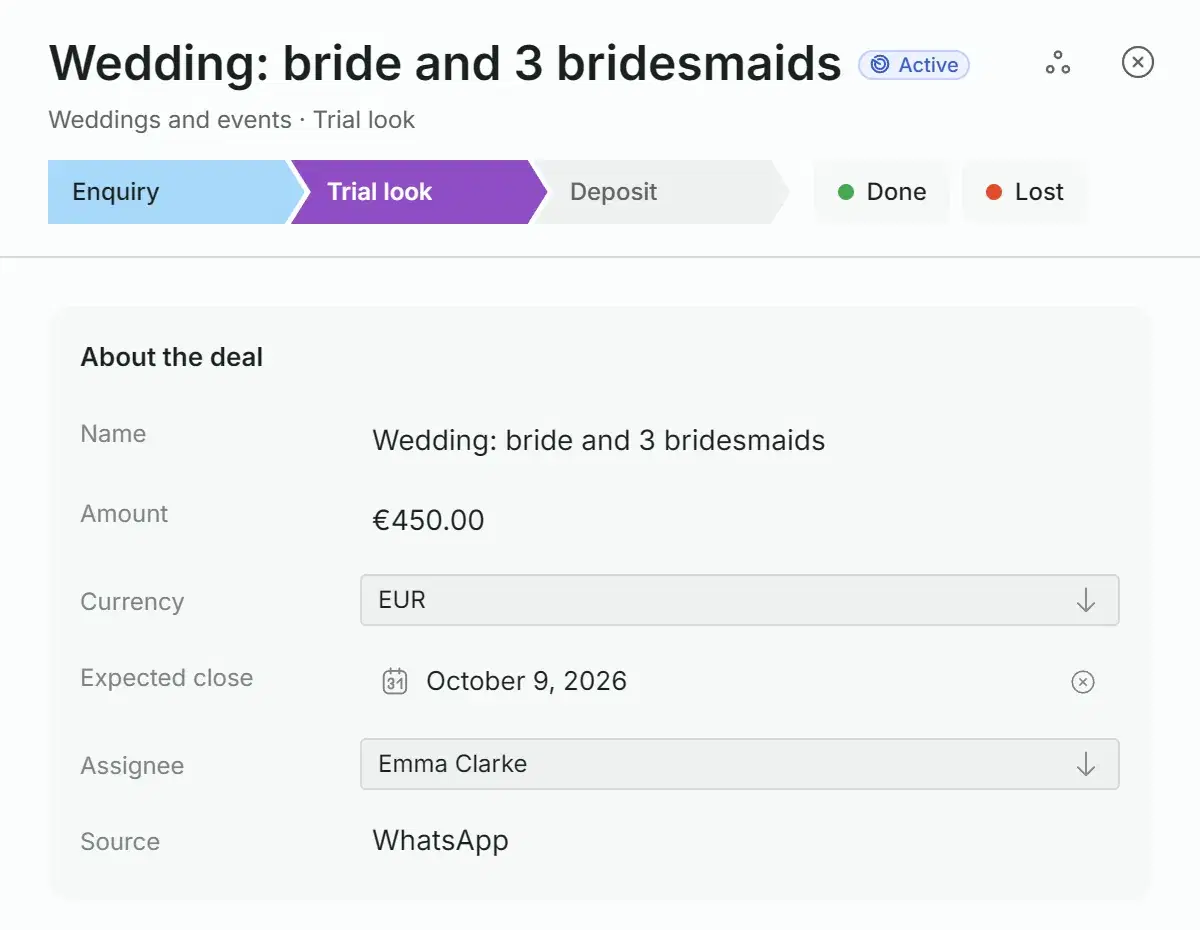
- Emma gave the deal a name, entered the amount and moved it to Trial look.
One request from WhatsApp. Nobody created the deal or picked its assignee: the messages in the chat did that.
Stay in the system your team already opens
Solwees does not replace your CRM. It talks to clients and puts the result where you already look. Pick a system to see what one conversation leaves in it.
Every chat goes into an Open Line of your portal, with the contact and the deal or lead Bitrix24 opens for it. Solwees moves it through the stages you assign to events, and your team can answer the client right from Bitrix24.
SolweesI am passing you to our administrator: she will arrange travel and the deposit.
Contact
Victoria Hale · +34 632 555 614
Deal or lead
Opened by Bitrix24 · stage from your event map: handoff to a manager
Deal timeline
Summary from the assistant: wedding on October 18, bride and 3 bridesmaids, €450 · contact · reason for the handoff
The sales assistant finds the contact by phone or creates one, opens a lead in the pipeline and stage you chose, fills in the budget when the client names it, and writes the conversation and a handoff summary into the lead’s notes. On a handoff the lead moves to your manager stage if the pipeline has a stage named for it.
No CRM yet? Deals, pipelines and tasks are already inside Solwees. Connect Solwees CRM in the App Directory and create a pipeline: there are no keys to enter. From then on a deal opens by itself after a client’s first message or call.
What Solwees takes from your booking system
The schedule and free slots of your staff, your services and prices. The assistant answers the client with what is in the system right now.
What it writes into it
The booking with the client’s name and phone, and later its change or cancellation where the system allows it. Your front desk sees it in the calendar they already use.
Every request on one board
This is a board of the demo salon: its second pipeline, Treatments, where the front desk adds deals by hand. A card shows what matters: the deal name, the amount, the client, the next step and the channel.
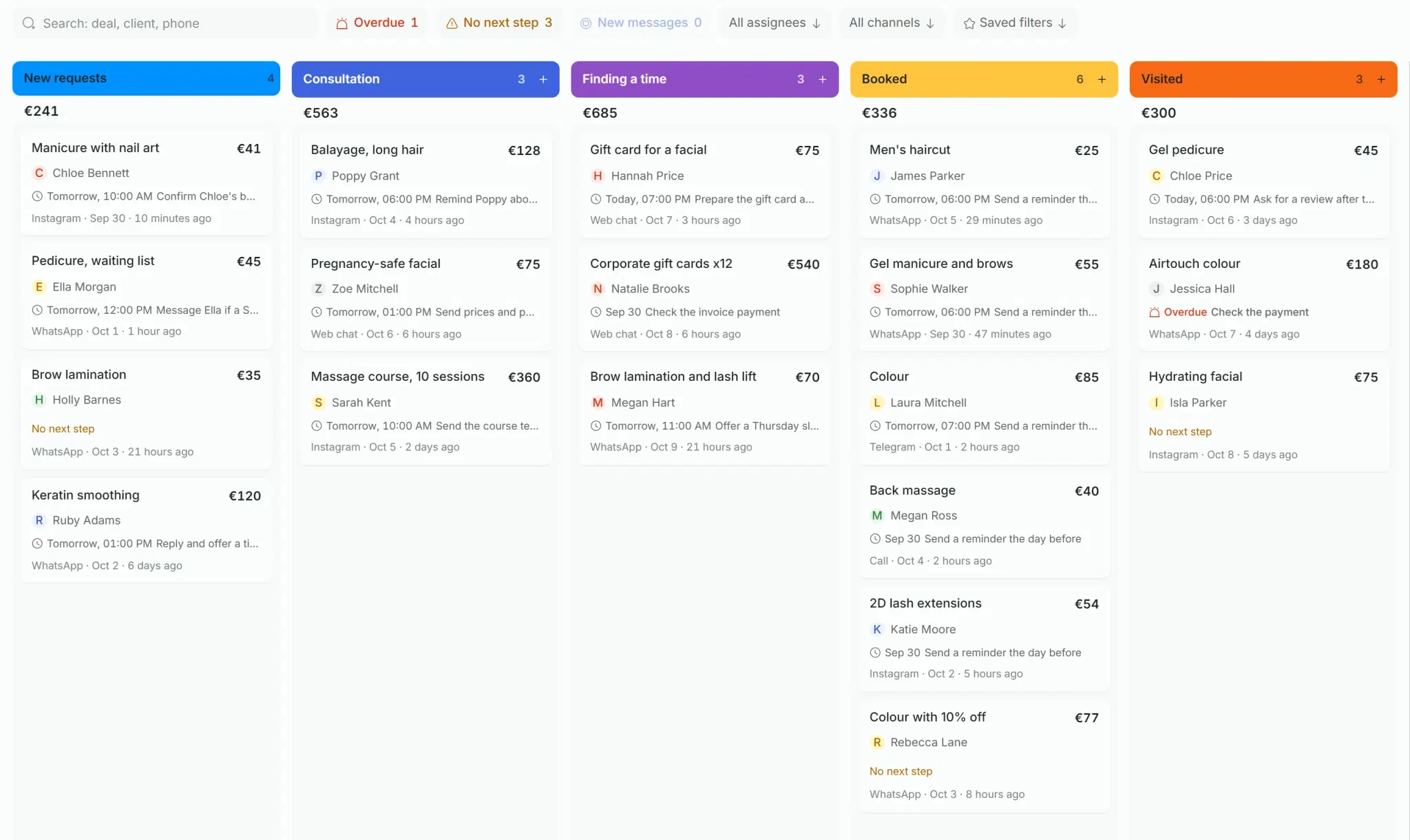
The board is wider than the screen: scroll sideways to see all five stages.
Money at every stage
Each column shows the number of deals and their total. Amounts in different currencies are counted separately.
What needs attention
Three counters above the board: deals with an overdue activity, with no next step and with new messages. Click one and only those deals stay.
A list for bulk work
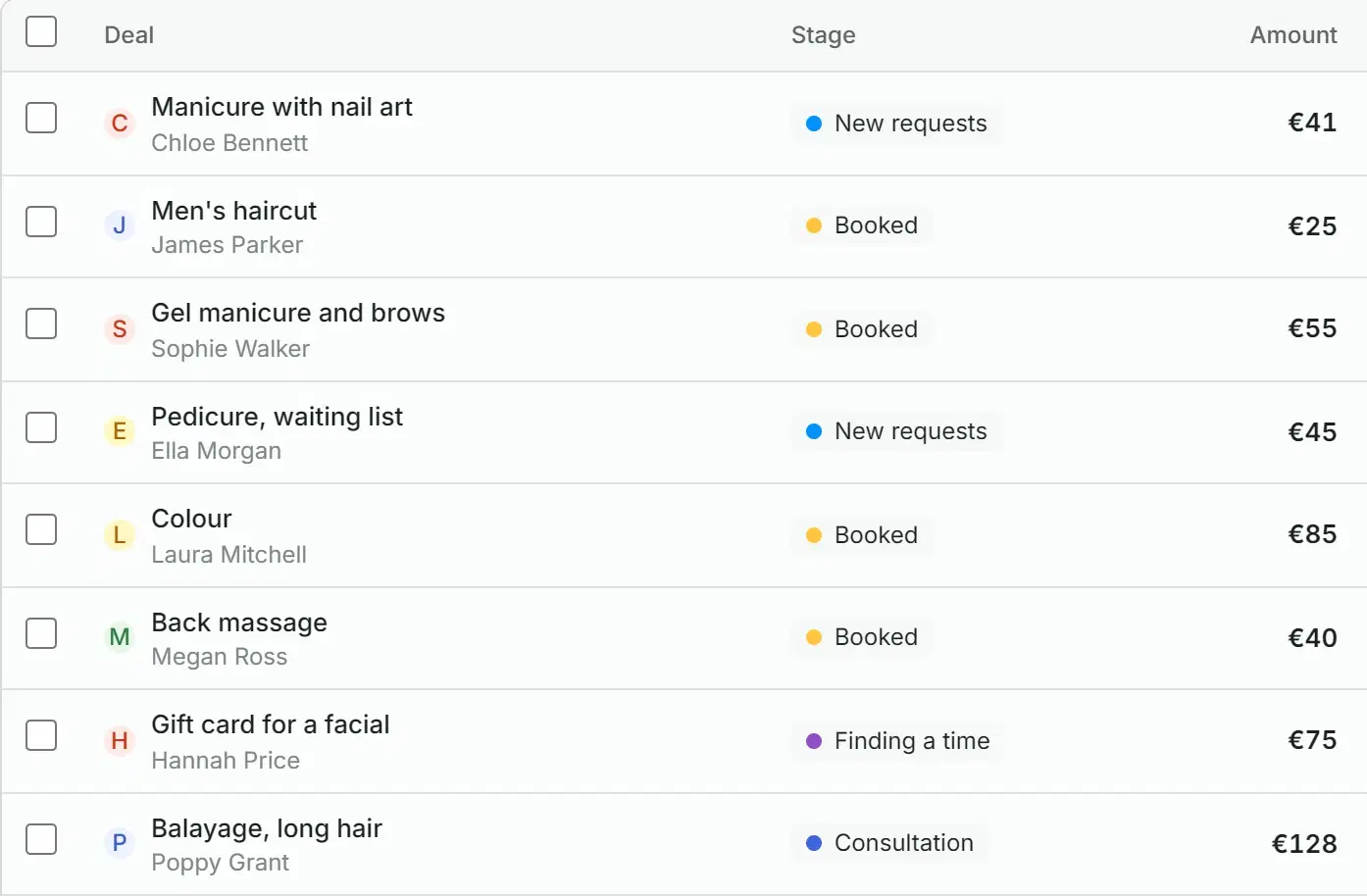
The same deals as a table, sorted by amount, last activity or date. Tick several and move them to a stage, assign them or delete them at once.
Close a deal by dragging it
While you drag a card, Won and Lost areas appear below. For a lost deal Solwees asks why: too expensive, no suitable time, went elsewhere, stopped replying, changed their mind, or your own words.
A pipeline that runs without reminders
You set it up once for each pipeline. After that deals change stage, find an assignee and wait to be sorted on their own.
For each pipeline you choose the stage a deal goes to when something happens in the chat.
- The assistant replies to the client: the deal goes to the stage you chose.
- A teammate writes to the client: a stage of its own, and the deal gets an assignee.
- The chat is closed: a stage of its own for a booking, a resolved question, a lost client and spam.
- Up to 10 pipelines, each with its own stages, colours and rules.
The second pipeline: deals are added to it by hand.
During the conversation
When the chat is closed
- New requestsincoming
- Consultation
- Finding a time
- Booked
- Visited
- Paidwon
- Lost
The deal stays at its stage.
Choose how deals are shared among the people of a pipeline: you assign them yourself, they go in turn, or to whoever has the fewest open deals.
- A returning client goes to the person who handled them before, while that person is in the pipeline team.
- While the assistant is answering, it holds the deal. A person is assigned when the chat is handed over.
- A teammate can be limited to chosen pipelines and the chats in them.
A deal that opens on its own lands on the incoming stage of the default pipeline. All such deals are gathered in the Unsorted folder next to the chats: who wrote, from which channel and when.
- Accept moves the deal to the first working stage of the default pipeline.
- Spam is removed from deals, the contact stays in your client base.
- The counter on the folder shows how many requests are waiting.
The deal card holds everything known about it
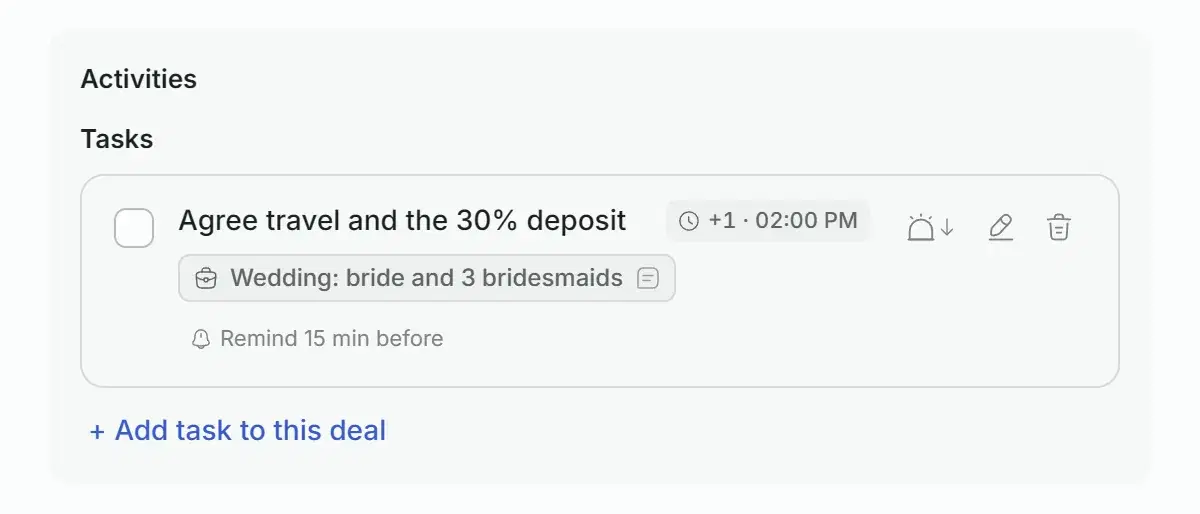
This is the deal from the conversation at the top of the page: the same wedding request, now with Emma.
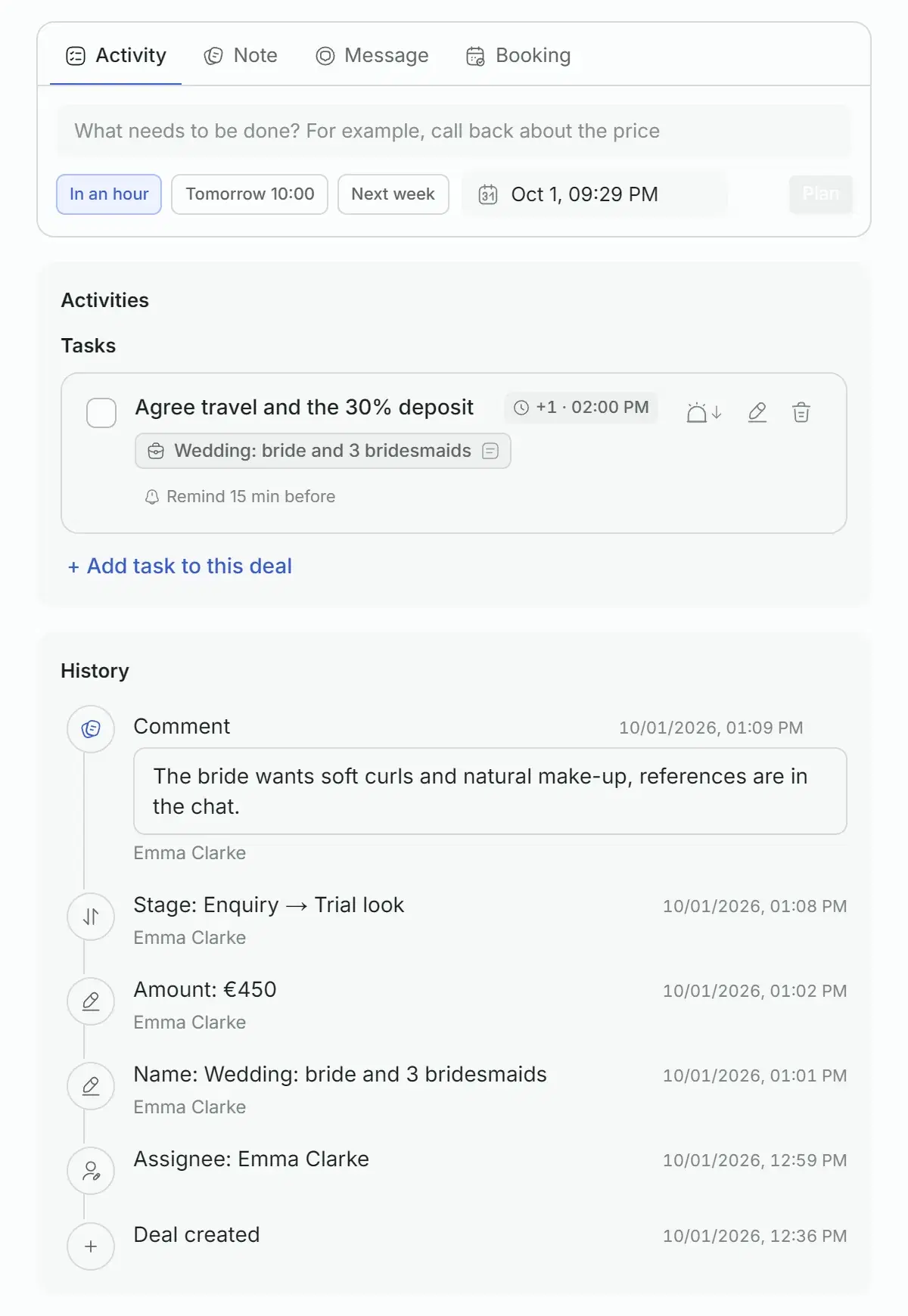
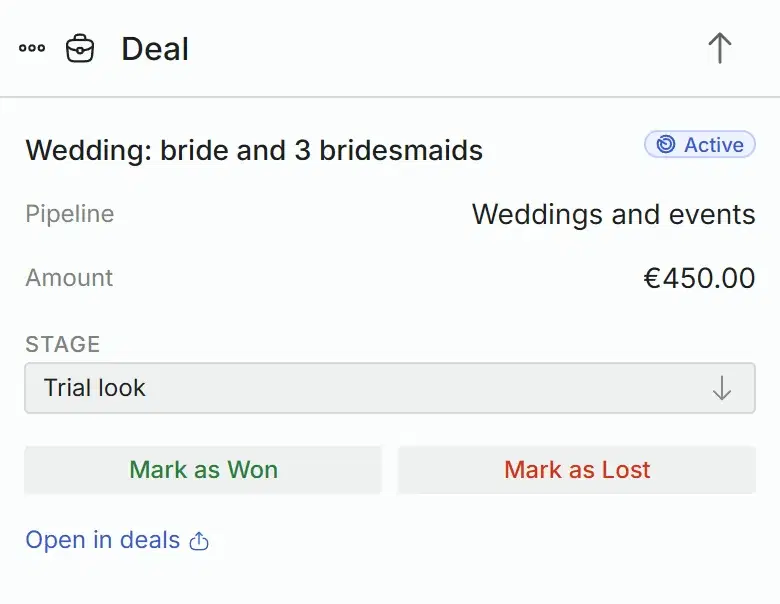
The card is wider than the screen: swipe sideways to see the rest.
The essentials
Name, amount, currency, expected close date and assignee are edited in place. The source and the client’s contact are shown next to them.
Stages and outcome
The next step
History
Your own fields
The deal next to the conversation
Tasks
Overdue
- 2:00 PM
Check the payment
Airtouch colour
Today
- 6:00 PM
Ask for a review after the visit
Gel pedicure
- 7:00 PM
Prepare the gift card and greeting card
Gift card for a facial
Tomorrow
- 2:00 PM
Agree travel and the 30% deposit
Wedding: bride and 3 bridesmaids
- Types: call, meeting, follow-up and other.
- Reminder: at the due time, 15 minutes, an hour or a day before.
- The list is split into Overdue, Today, Tomorrow, This week and Later.
- Switch between Mine and Whole team to see your tasks or everyone’s.
- Running late? Snooze for 15 minutes, an hour, three hours or until tomorrow.
Tasks that do not get forgotten
A task has a due time, a type, an assignee and a reminder. Link it to a deal or a client and it shows up in the deal card, in the chat and in the common list.
Agree travel and the 30% deposit
Wedding: bride and 3 bridesmaids
- Dashboard: a reminder card on top of any screen, with a sound
- App: a notification on your phone
- Telegram: your chat with the team bot, once it is connected
Everything in deals and tasks
The full list, group by group.
Board and list
- Board by stages with a count and a total for each, and a total for the pipeline
- List view sorted by name, amount, activity or date
- Search by deal, client or phone
- Filters: overdue, no next step, new messages, assignee, channel
- Saved filters
- Several deals at once: move, assign, delete
- Quick deal right in a column
- Next step and overdue mark on every card
- Amounts in 13 currencies
Pipelines and rules
Deal card
Tasks
Team and access
With your CRM
Friday, October 2
1:45
Solwees
nowTask reminder
Agree travel and the 30% deposit
Before you start
The same on your phone
The Solwees app has the same deals board, the deal card, tasks, unsorted requests and pipeline rules. A task reminder arrives as a notification, as on this screen.
Who sees what
The owner, administrators and managers set up pipelines, stages and rules. Operators and viewers do not get the pipeline settings. A teammate can be limited to chosen pipelines.
Plan
Deals and tasks are open during the free trial. After it they are a paid module, CRM and tasks, that is added to any plan; its price is on the pricing page.
Good to know
Questions about CRM
We already have a CRM. Do we have to move to the Solwees one?
No. Solwees works on top of the system you already use. From a booking system it reads the schedule, services and prices and writes bookings back. Into Bitrix24 or amoCRM it writes the chats and what came of them. The built-in deals and tasks are for businesses that have no CRM yet.
Where do deals come from?
Once Solwees CRM is connected and a pipeline exists, a deal opens by itself after a client’s first message or call in any connected channel and keeps the channel as its source. It opens in the default pipeline. A client has one open deal per pipeline, so new chats are linked to it. You can also create a deal by hand: with the full form, in a column of the board or from a chat.
Can a deal move through the stages by itself?
Yes. For each pipeline you choose a stage for the event when the assistant replies to the client, a stage for the event when a teammate writes to the client, and stages for a chat closed with a booking, a resolved question, a lost client or spam. A rule fires every time its event happens. All other moves are done by dragging the card or clicking a stage.
Who becomes the assignee of a new deal?
You choose a rule for each pipeline: assign manually, in turn among the pipeline team, or to whoever has the fewest open deals. A returning client can go to the person who handled them before, and while the assistant is answering it holds the deal.
What does Solwees write to Bitrix24 and amoCRM?
In Bitrix24 every chat goes into an Open Line with its contact and its deal or lead, the stage changes by the events you mapped, and a handoff leaves a summary in the deal timeline. In amoCRM and Kommo the sales assistant creates the contact and the lead, writes the conversation and a handoff summary into its notes, and can move it to your manager stage.
Is it included in my plan?
Deals and tasks are open during the free trial. After it they are a paid module, CRM and tasks, that is added to any plan; its price is on the pricing page.
Connect your CRM. No CRM yet? Start with the built-in deals.
Connecting Solwees CRM and creating the first pipeline takes a minute. After that deals appear from the conversations on their own.