
Calls scored by your criteria, chats checked against your scripts.
Solwees transcribes your team’s calls and scores each one by your criteria: the greeting, what the client needs, a concrete time, an extra service, the next step, with a quote for every mark. Chats are reviewed against your sales scripts, and the Managers tab shows each person’s week.
Reports › Managers › Calls
Olga with Sophie Walker
Call · incoming · 4:05
8/10
AI score
Scoring criteria5 of 5 scored
Greeted the client and gave her name
“Good afternoon, Studio Demo, this is Olga.”
Said in the first seconds of the call.
A call to the studio, scored by its five criteria: a quote or a reason for each mark, 8 out of 10. Pick a criterion to see its proof.
Every closed chat gets a review
When a chat with a manager closes, Solwees reviews it: how fast the manager answered, whether it ended in a sale, which objections came up and whether the script was followed. One review per conversation, with a score and what to change.
Speed counted, not guessed
Reply times are calculated exactly from the message timestamps, not estimated by the AI. The review only uses those numbers.
Sale, thinking or no sale
Each chat gets an outcome: a sale, thinking, no sale, or not a sale at all, such as a delivery question. Only chats with buying intent count toward conversion.
Objections and missed chances
Price, timing, doubts: each objection is listed with whether it was handled, next to the chances that were missed.
Your script
Give us your sales steps, and each chat is checked against them: by the script, partly, or not.
Chats from Solwees and your CRM
Chats in Solwees and in connected CRMs such as Sitniks. Chats handled only by the AI assistant are not part of the review.
Chat · Instagram
Marina with Emma Brown
Hi! How much is a lash lift, and is anything free on Saturday?
reply in 95 s
Hi Emma! A lash lift is €45. On Saturday I can offer 11:00 or 15:30. Which suits you?
15:30 please
reply in 1 min
Booked: Saturday, 15:30, lash lift. A brow tint goes well with it, shall I add it?
Not this time, thanks!
- met
First reply: 95 seconds, calculated from the message timestamps.
- met
Script: followed: named the price, offered two times and an extra service.
- not met
Missed: did not say what the brow tint costs.
AI score9/10
Calls are transcribed and scored too
Calls from Bitrix24 telephony are transcribed and reviewed like chats, and so are the chats of its Open Lines. Each call shows the manager, the client, the length, the outcome and the score, with the transcript one tap away.
From Bitrix24
Telephony and Open Lines of your connected portal. The review also goes into the call’s timeline in Bitrix24 as a comment.
Transcripts you can read
Open the transcript under any call. It can also be saved as a conversation in Solwees, next to your chats.
Only real conversations
Calls shorter than 40 seconds are skipped by default, and a voicemail is marked as no conversation instead of getting a bad score.
Fair to the manager
A call is recorded on one track, so speech recognition sometimes slips. Those slips are never counted as the manager’s mistakes.
Reports › Managers · from Bitrix24
No conversation (voicemail): 2
TranscriptSale
…Good afternoon, Studio Demo, this is Olga. Hi, I’d like a manicure this weekend. What would you like: a classic manicure or with gel polish? Gel, please. Saturday at 11:00 or 15:30, which suits you?…
The call is recorded on a single track: lines aren't split by speaker.
Your scorecard, applied the same way to every call
Send us the table your team already works by: the criteria, and which of them count for each type of call. Solwees decides the call type, finds each item in the conversation and counts the score by your rules, so two calls with the same facts always get the same mark.
Criteria by type of call
A studio may need five criteria; a sales team may have 12 criteria and 5 types of call: qualifying a new client, selling to a new or a regular client, a follow-up push, a clarification.
Facts first, then the score
The review reports what was said: which greeting items, how many times the client’s name, the push, the extra offer. Your rules turn that into grades, and the score from 1 to 10 is calculated by formula.
Your exceptions
When the client is ready to buy right away, the questions and presentations a manager would skip in such a call are not scored.
Easy to change
A new rule, such as a shorter greeting for regular clients, is a change to your table, not a rebuild of Solwees.
Example
A sales team's scorecard
Type of call
| Criterion | Qualifying a new client | Selling to a new client | Selling to a regular client | Follow-up push | Clarification |
|---|---|---|---|---|---|
| Greeting | |||||
| Setting the agenda* | |||||
| Qualification* | |||||
| Client's name | |||||
| Handling objections | |||||
| Push to decide | |||||
| Add-on offer | |||||
| Company presentation* | |||||
| Product presentation* | |||||
| Tone | |||||
| Speech | |||||
| Next step |
Selling to a new client: 12 of 12 criteria are scored
* Client ready to buy right away: the agenda, qualification and both presentations are not scored.
Quotes as proof, checked against the transcript
Every mark rests on what was actually said. Solwees checks each quote against the transcript, and a quote that is not there does not count, so a score cannot be raised by a phrase nobody said.
Each quote is checked
Before it counts, a quote is matched against the transcript of the call.
An invented quote is dropped
A quote that is not in the transcript is left out of the score.
How quotes are checked · Olga with Sophie Walker
…Good afternoon, Studio Demo, this is Olga. Hi, I’d like a manicure this weekend. What would you like: a classic manicure or with gel polish? Gel, please. Saturday at 11:00 or 15:30, which suits you? At 11, please. Great: a gel manicure on Saturday at 11:00, that’s €35. I’ll send the confirmation to WhatsApp, see you on Saturday…
Quotes in the review
No such offer was made in the call, so “Offered an extra service” stays a cross.
The Managers tab: every person in one table
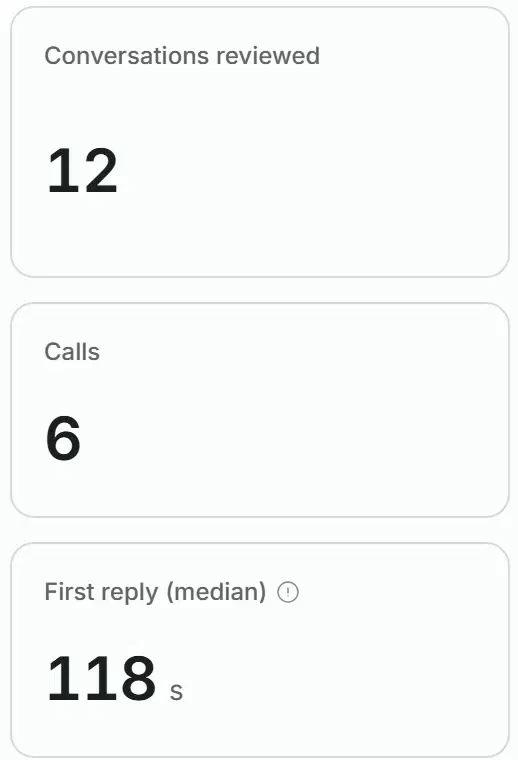
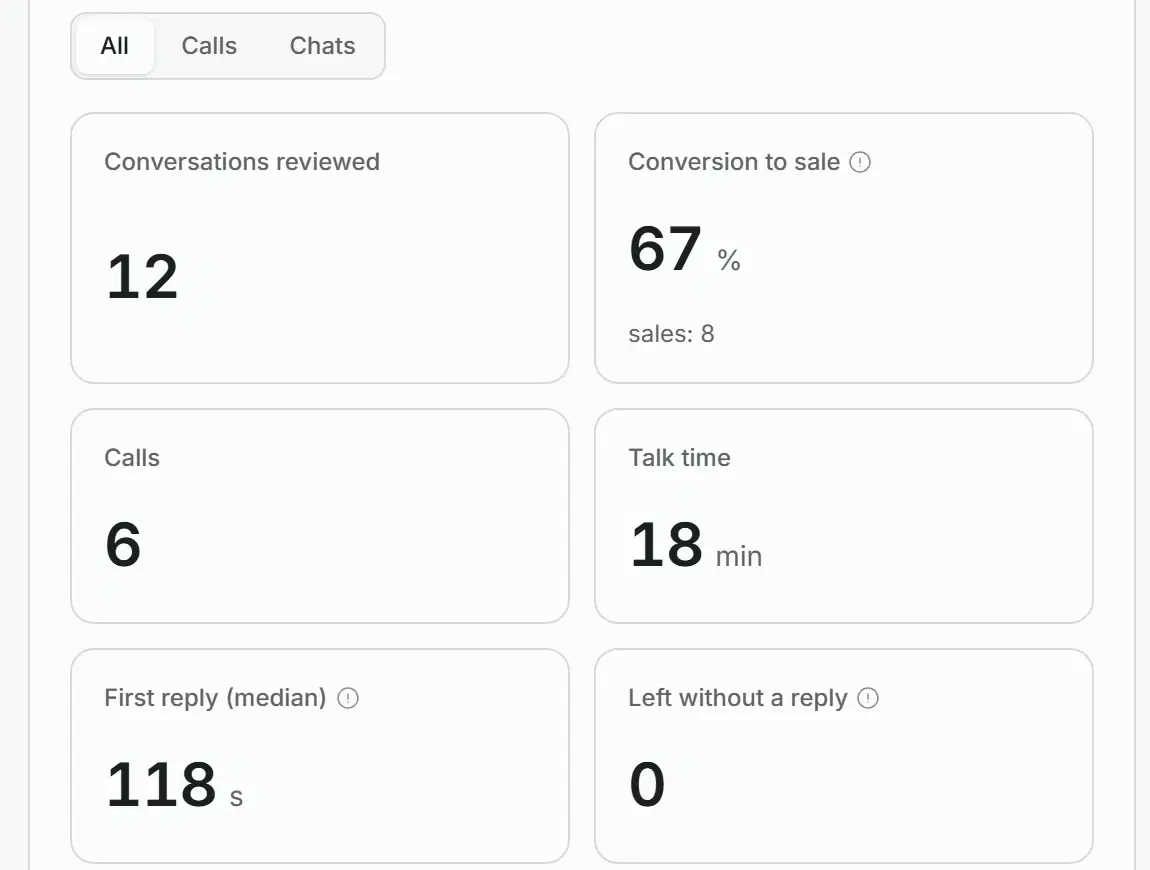
In Reports, the Managers tab gathers every reviewed call and chat of the period you pick: how many were reviewed, the conversion to sale, calls and talk time, the first reply, and a row per person.
The period at a glance
Conversations reviewed, conversion to sale, calls, talk time, the median first reply and chats left without a reply.
Calls, chats or both
Switch between all conversations, only calls and only chats.
A row per person
Calls, chats, sales, the average AI score, talk time, reply time and the mistakes that repeat most often.
Down to each conversation
Under the table, every call opens with its criteria and transcript, and every chat with its review.
A weekly report against the week before
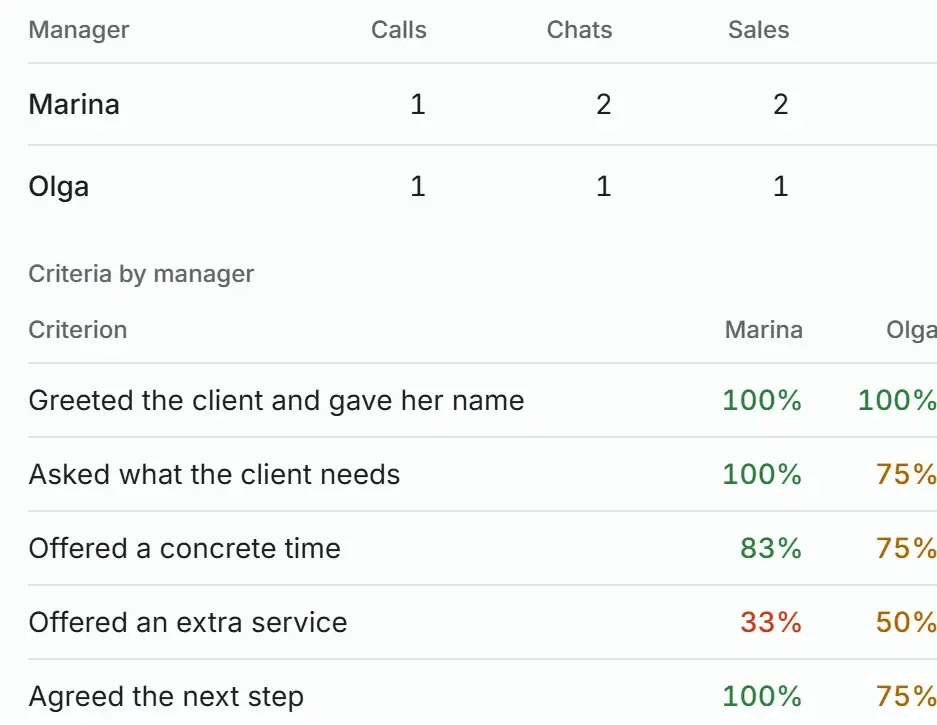
Every week Solwees puts together the results by person and compares them with the week before, whatever period you look at in Reports.
Criteria by manager
The average score of each criterion in the week’s calls, per person and for the team. You see at once who skips the extra service.
What each person should work on
Open a person’s row under the table to see their strengths, common mistakes and recommendations from the week’s reviews.
The week in four figures
Conversations reviewed, conversion to sale, the average AI score and talk time, each next to last week’s figure.
Week by week
Browse back with the arrows: the weekly report does not depend on the period picked above it.
We switch it on for you
Manager review is switched on by Solwees for your workspace, on request. We enter your scorecard and scripts together with you, and the first reviews cover the calls of the last week.
Your sources
Chats in Solwees or a connected CRM such as Sitniks, calls and Open Lines from Bitrix24.
Your scorecard and scripts
The table of criteria by type of call, your sales steps and a sentence about what you sell, so the review knows what a good needs analysis sounds like.
The first run
Calls of the last 7 days are taken first, then every new one.
What we set up
Which sources to take, the shortest call to review, the comment in Bitrix24, and whether call transcripts are kept as conversations.
Assistant settings
Manager chat analysis
Switched on by the Solwees team, on requestAnalyse managers' chats
onSales scripts
1) Greet and give your name 2) Ask what the client needs 3) Offer a concrete time 4) Offer an extra service 5) Agree the next step
What the company sells
A beauty studio: manicure and pedicure, lashes and brows, facials.
Bitrix24
Take calls and chats from Bitrix24
onReview calls
onReview Open Lines chats
onPost the review as a CRM comment
onCall transcripts as conversations
onSkip calls shorter than (seconds)
40Everything manager review does
The full list, group by group.
- A review of every closed chat with a manager’s reply
- First reply and reply time counted from message times
- Outcome: sale, thinking, no sale, not a sale
- Objections, and whether each was handled
- Missed chances and recommendations
- Checked against your sales script
Bitrix24 · deal timeline
Sophie Walker, gel manicure
Call review
- Manager: Olga
- Score: 8 of 10
- Result: sale
- What the client needs: a gel manicure this weekend
- Next step: Saturday, 11:00, gel manicure
- Mistakes: no extra service offered
Automatic review by Solwees
Before you start
How it is switched on
We switch it on for your workspace, on request. We set it up together with you.
What it needs
Chats in Solwees or in a connected CRM such as Sitniks. For calls, a connected Bitrix24 portal that records them.
Your scorecard
Optional: without one, chats and calls are reviewed by common sales sense and your scripts.
Questions about manager review
Which chats and calls can be reviewed?
Chats in Solwees and in connected CRMs such as Sitniks, and calls and Open Lines chats from Bitrix24. Each closed conversation gets one review. Write to us about your setup, and we will tell you what can be connected.
Can I use my own scorecard?
Yes. Send the table your team works by: the criteria, which of them count for each type of call, and your exceptions. Solwees applies it as it is, and the score is counted by your rules, not by a general impression.
Can the AI make up a quote to raise or lower a score?
No. Every quote in a call review is checked against the transcript, and a quote that is not there does not count. The review reports facts, and the score is calculated from them by formula, by your rules.
How is reply speed measured?
From the client’s message to the manager’s reply. Reply times are calculated exactly from the message timestamps, not estimated by the AI.
Where do I see the results?
In Reports, on the Managers tab: each manager’s scores, calls and chats with transcripts, a weekly report compared with the week before, and the result by every criterion. With Bitrix24, the review also lands in the call’s timeline as a comment.
How do I switch it on?
Write to us. We switch manager review on for your workspace, connect your sources and enter your scorecard and scripts with you, and the first reviews cover the calls of the last week.
See how your team really sells
Send us your criteria, connect your chats and calls, and next week’s report shows each person by every criterion.