
Every channel in one inbox.Solwees answers, you see it all.
WhatsApp, Instagram, Telegram, Viber, the chat on your site, email and calls land in one Solwees inbox, one row per client. The assistant answers first; your team sees every conversation, steps in when a person is needed and answers from the dashboard or the phone.
Your inbox
13 open
- Chloe BennettInstagramOlivia at 6:30 please 🙌16:30AI
- James ParkerWhatsAppYou’re booked for today at 7:00 pm, men’s cut16:04AI
- Laura MitchellTelegramThank you so much!14:54AI
- Hannah PriceChatNoted! See you after 6:00 pm 💐13:52Operator
- Oksana KravetsViber15:30, please12:40AI
- Sophie WalkerCallMoved the pedicure to Sunday, 11:0012:10AI
Messages come in from different channels all day: each one rises to the top, and you see at a glance who is answering it, the assistant or a person.
One client, every channel
A client who wrote in Instagram, answered a reminder in WhatsApp and then called is one person in Solwees: one row in the list, one conversation with everything in it.
Joined by phone number
Conversations with the same phone number come together by themselves.
Instagram and Telegram too
These channels do not share the number. Once the assistant learns it while booking, the chats join the rest.
Or by hand
Merge contact joins two clients the team knows are the same person.
InstagramMonday
Hi! I love this design, how much would it be?
Gel manicure with nail art, €41. Booked: Tuesday, 18:30 with Olivia.
WhatsAppMonday evening
A reminder: tomorrow at 18:30, manicure with Olivia. Reply 1 to confirm or 2 to move it.
1
CallTuesday
Hi, it’s Chloe, I’ll be ten minutes late.
Thank you for letting us know, Chloe. I have told the team. See you soon!
The whole inbox on one screen
Folders and channels on the left, the list in the middle, the open conversation on the right. This is Chloe’s chat from the top of the page, in the inbox of the demo salon.
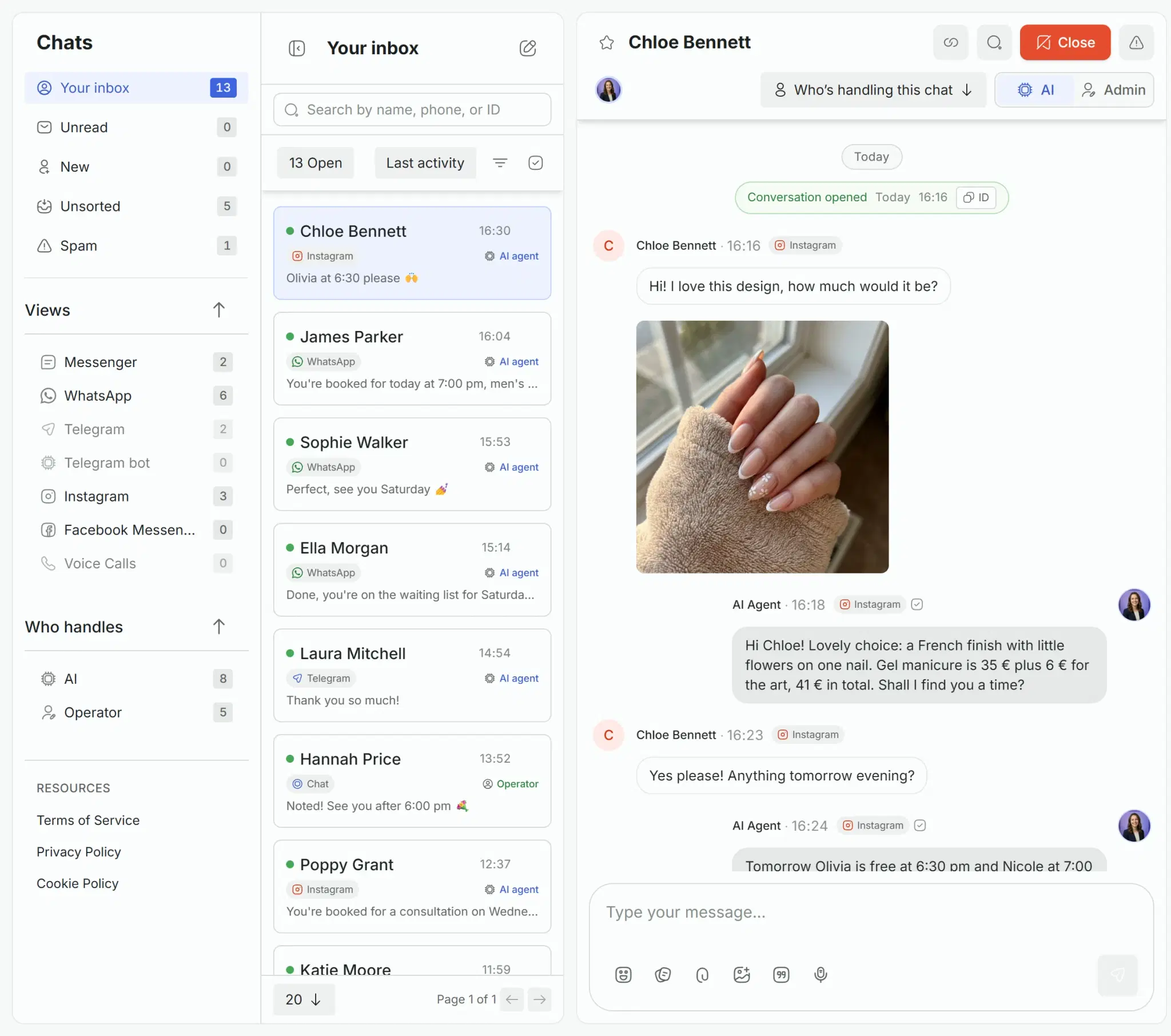
Swipe the screen sideways to see all of it.
Find any conversation in a second
Folders, filters by channel and by who is answering, statuses and search: the list shows what you need now.
Folders
Your inbox, Unsorted and Spam. Unread and new clients have filters of their own.
Channels
A row per channel with its count: WhatsApp, Instagram, Telegram, the chat on your site and the rest.
Who handles
AI or Operator: see which conversations the assistant answers and which a person has taken.
Search and order
Search by name, phone or ID. Sort by last activity, by start or by how long the client has been waiting.
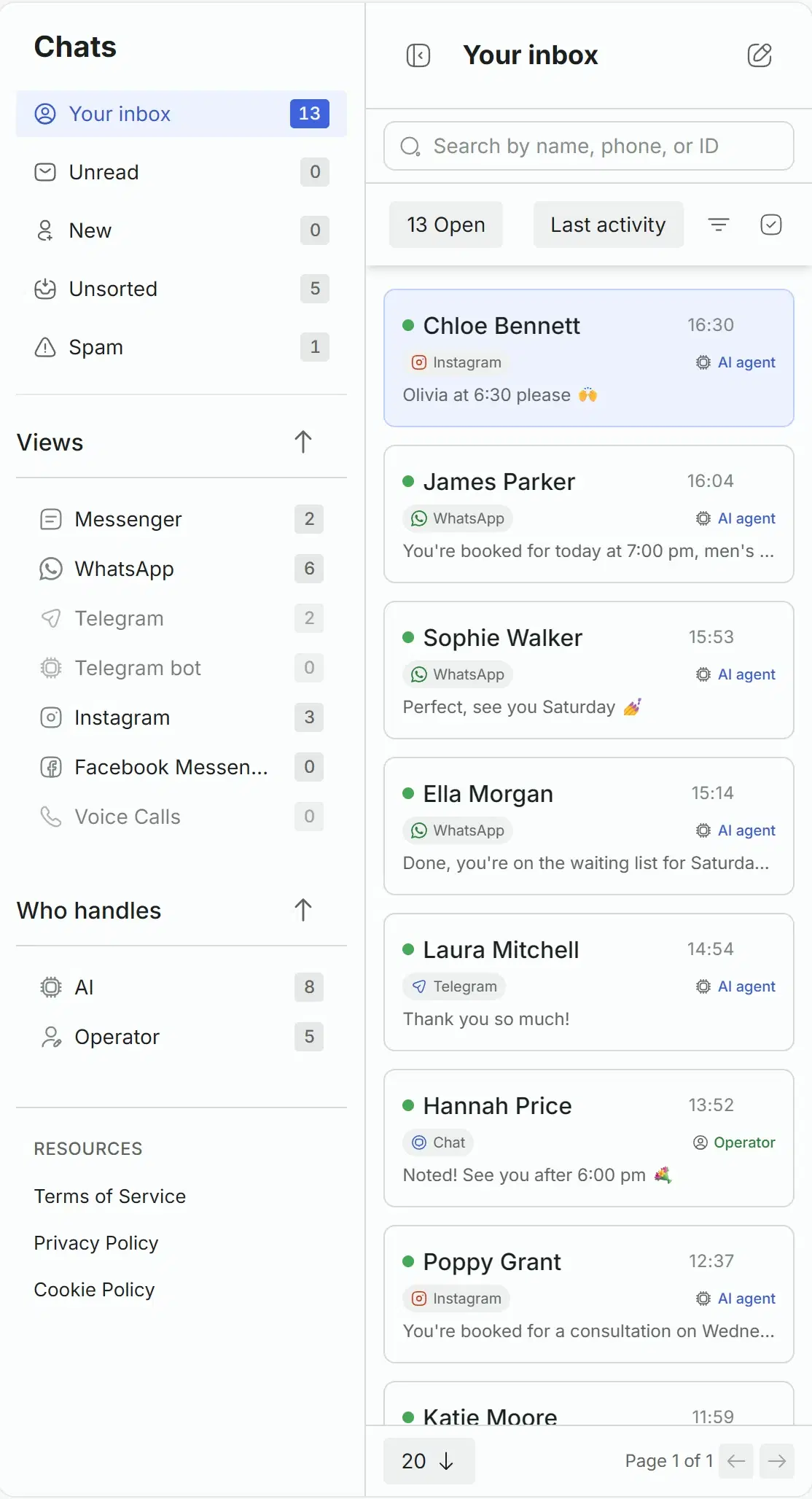
The assistant and the team in one chat
The assistant answers first. When a person is needed, it leaves a note, and anyone on the team takes the chat in one move.
AI or Admin
A switch in the chat header shows who is answering. A teammate who starts typing takes the chat.
Back to the assistant
Hand the chat back by hand, or let it return by itself after the time you set.
Notes
The assistant’s note says what the client wants. Internal notes and mentions of teammates stay inside the team.
Everything in the reply
Quick replies with a slash, files, pictures from the knowledge base, voice messages, reactions. A message can be edited or deleted.
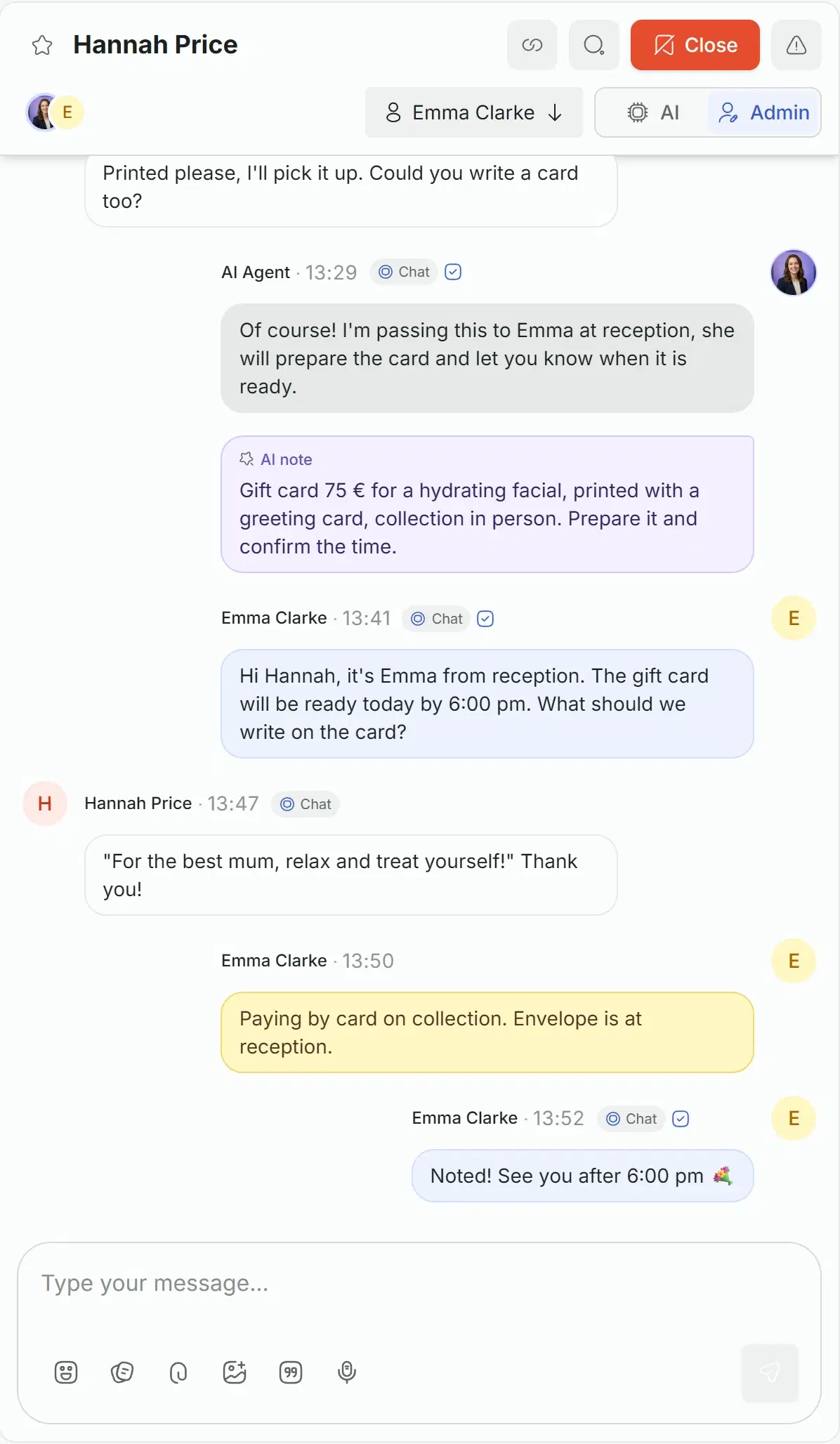
What needs a person, right now
The Needs attention panel collects the clients waiting for a person, with the reason, and the tasks that are due. It rings, so nobody misses it.
Who is waiting and why
Each card names the client, the channel and what the assistant could not do.
Answer or hand back
Take the conversation, or hand it back to the assistant if it can carry on.
Wherever you are
A sound and a browser notice in the dashboard, a push in the mobile app, an alert in Telegram if you connect it.
Needs attention
Sound onClient is waiting for an operator
Hannah PriceChat
Wants a €75 gift card for a facial, printed with a greeting card.
AnswerHand back to AIClient is waiting for an operator
Sophie WalkerCall
On the line: asks for a refund for a cancelled visit.
AnswerHand back to AIA task is due
Today, 18:00
Get Hannah’s gift card ready.
Close with an outcome
Every closed conversation says how it ended, so the reports count real results.
Resolved, booked, lost or spam
A lost conversation asks for the reason, so you see why clients leave.
Snooze
Put a conversation aside until later, and it comes back by itself.
Several at once
Close, snooze or star several conversations together.
Close the conversation
How did it end?
- Resolved
- Booked
- Lost
- Spam
Calls in the same inbox
A call to your number is a conversation too: the transcript appears turn by turn while the call goes, and the recording stays with it.
Live call
The transcript is written while the client speaks, so the team follows the call without listening.
Recording
After the call, the recording and the full transcript stay in the conversation.
Join the call
When the assistant asks for a person, Answer in Needs attention puts the call through to you.
Hi, it’s Sophie. Can I move my pedicure from Saturday to Sunday?
Of course, Sophie. On Sunday Olivia is free at 11:00 and 13:30. Which one suits you?
11:00, please.
Done: Sunday at 11:00 with Olivia. You will get the confirmation in WhatsApp.
Everything in the Solwees inbox
The full list, group by group.
Channels
- Instagram Direct, stories and comments
- Telegram: your bot or Business account
- Facebook Messenger
- Viber on your own number
- TikTok messages
- The chat on your website
- SMS
- Phone calls with their transcripts
The list
The conversation
The client card
The team
The mobile app
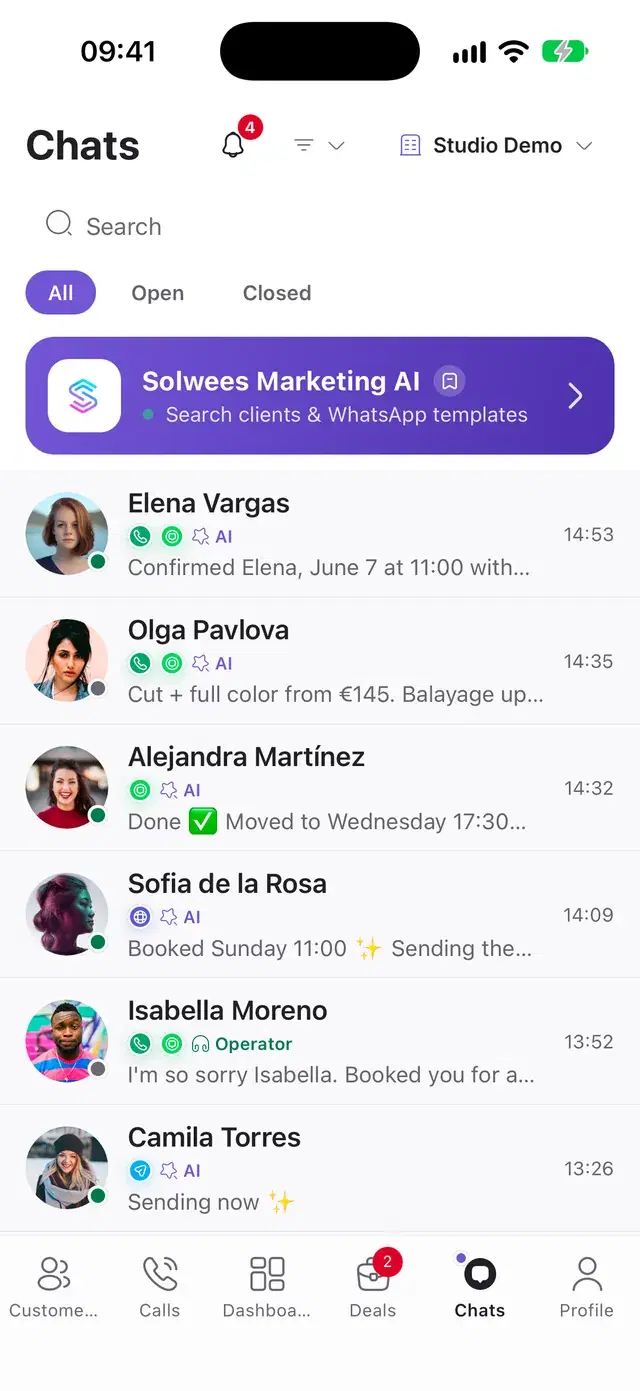
Before you start
Plan
The inbox is part of every plan, and the channels you connect come into it. The plans are compared on the pricing page.
Who sees what
Everyone with access to the inbox sees the workspace’s conversations. Roles decide who can reply and manage.
On the phone
The mobile app has the same inbox. Snoozing, merging contacts and the deal block are in the web dashboard.
Good to know
Questions about the inbox
What is a unified inbox?
One list for every conversation with your clients: WhatsApp, Instagram, Telegram, Messenger, Viber, the chat on your site, email and calls. In Solwees the assistant answers first, and your team sees each conversation, steps in and replies from the same place.
Does a client appear once if they write in different channels?
Yes, when Solwees knows it is the same person. Conversations with the same phone number join by themselves; Instagram and Telegram chats join once the assistant learns the number while booking; and two contacts can be merged by hand.
How does my team take over from the assistant?
A teammate starts typing in the conversation, and it goes to a person: the AI and Admin switch in the header shows who is answering. The chat goes back to the assistant by hand, or by itself after the time you set.
How do I know that a client needs a person?
The Needs attention panel shows every client waiting for a person, with the reason, and rings when a new one comes. The same goes out as a push in the mobile app and, if you connect it, as an alert in Telegram.
Can we answer from the phone?
Yes. The Solwees mobile app has the same inbox: merged conversations, filters, the AI and Admin switch, notes, quick replies and voice messages, and a handed-over call is answered on the phone’s call screen.
Are phone calls in the inbox too?
Yes. A call is a conversation with its transcript, written turn by turn while the call goes, and the recording after it. When the assistant asks for a person during a call, Answer in Needs attention puts it through.
Bring every channel into one inbox
Connect the channels your clients write in, and the assistant answers in all of them while your team sees everything in one place.