
Offers the times you would offer. Books them the way you book.
Solwees finds free time in your booking system, offers it the way your front desk would and books the visit there. You choose how many time slots and which ones, the start-time grid, who is offered first, and whether it books itself or hands the request to your team. When your booking system prices a service by specialist level (Altegio), each free time comes with that specialist’s price.
Booked in Altegio: Friday 17:30, gel manicure, Mia
A gel manicure on Friday: two times in different parts of the day, each with that specialist’s price, and the booking goes straight into Altegio.
Which times it offers
The assistant sees every free time in your booking system. You choose what it says: how many time slots, which ones and when. If the day does not hold that many, it names fewer rather than invent one.
How many
One to six time slots in a reply. Two is the usual choice.
Which ones
One per part of the day; right after an existing booking, so the day has no gaps; evenly across the day; simply the soonest; or all free time as ranges, “from 11:00 to 13:00 and from 15:00 to 19:00”.
When
As soon as the service is clear, or only after the client names a day.
If the time does not suit
Alternatives at a different time of day, so it is a real choice, or the same hour on another day.
Assistant profile › Times to offer
Times to offer
When to name free time
As soon as the service is clear
How many times to offer
How times are chosen
One per part of the day: morning, afternoon, evening
What the client reads about Friday
On Friday I can offer 11:00 or 17:30. Which suits you?
A full day is not a no
When the day the client asked for is fully booked, the assistant offers the nearest free times on other days instead of saying there is nothing.
Straight to the nearest
Free times on the next days, named in the same reply.
Or it asks first
With “Ask before offering other days” on, it first asks “Shall I look at other days?” and searches once the client agrees.
“The nearest” across days
With no day named, it can offer one time on each of the next free days instead of several on the first.
Booked in Altegio: Tuesday 16:00, lash extensions, Mia
Two or three people in one chat
A client books for herself and one or two others. Each person gets their own service and specialist, and every booking goes into your booking system.
The same specialist
One after another: the next starts when the previous one finishes.
Different specialists
At the same hour, or at the nearest times within two hours of each other.
A child without a phone
Booked on the card of the person who writes, with the child’s name in the comment.
All or none
If one booking fails, those already made are cancelled: half a group booked is worse than none.
Four people or more
Such a request goes to your team.
In Altegio, Saturday
- 10:00Manicure · MiaSophie Walker
- 11:00Kids’ manicure · MiaOn Sophie Walker’s card, comment: Lily
Your start-time grid, your last start
If your booking system shows times every 15 minutes but you start visits only on the hour and half hour, the assistant offers and books only those. Free times off the grid are left out, never moved.
Every 15, 30 or 60 minutes
Or every free time the booking system shows. The grid applies wherever the assistant looks for time.
The last start
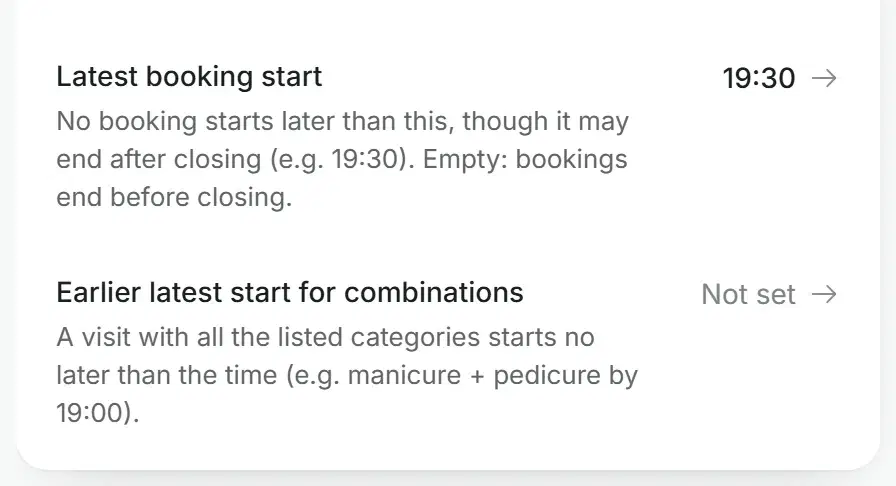
No booking starts later than the time you set, though a visit may end after closing.
Earlier for combinations
A visit that combines categories, such as manicure and pedicure, can have an earlier last start.
Assistant profile › Booking
Start times
Which start times can be booked
Free in Altegio on Friday evening, Emma
- 17:05 not offered
- 17:20 not offered
- 17:35 not offered
- 17:50 not offered
- 18:00 offered
- 18:15 not offered
- 18:30 offered
- 18:45 not offered
- 19:00 offered
- 19:15 not offered
- 19:30 offered
- 19:45 not offered
- 20:00 not offered
Times in dark are offered. The rest fall off the grid or start after 19:30.
Who is offered first
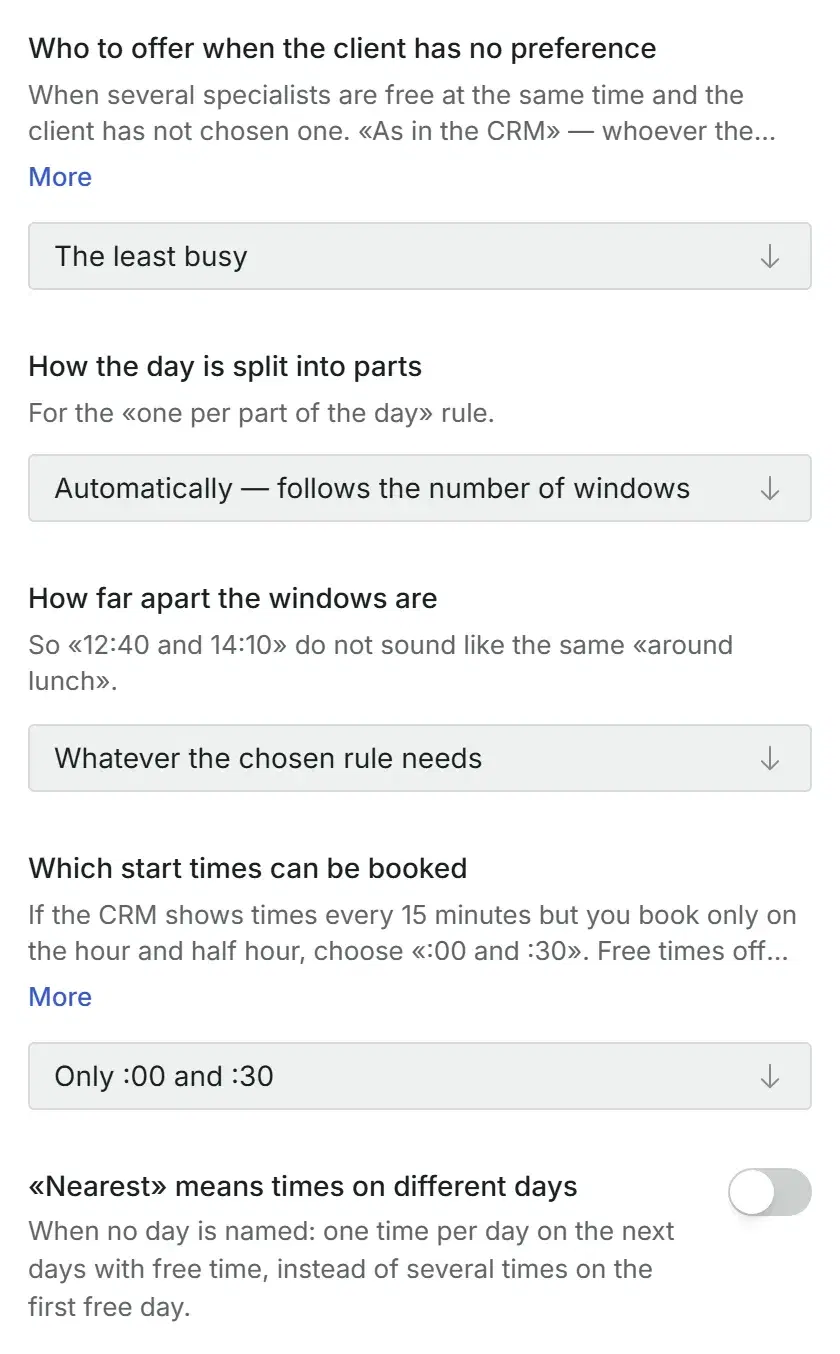
When several specialists are free and the client has no preference, you decide who comes first. A specialist the client names always wins.
If the client doesn’t mind
The specialist listed first in your booking system, or the least busy one that day, so clients are shared more evenly.
Backup specialists
Offered only when the others have no free time at the client’s day and hour. A client who asks for one by name still gets her.
Her usual specialist
The assistant sees the client’s booking history. Switch on “A regular client gets her usual specialist first”, and it offers the one she visited most.
The price of each
When your booking system prices a service by specialist level (Altegio), each free time comes with that specialist’s price.
A warranty fix with the same specialist
With Altegio, the assistant sees the warranty date in the client’s past visits. A fix within the warranty is offered in the free times of the specialist who did the work, and booked as a free 30-minute slot.
Only that specialist
No other specialist and no paid service is offered instead.
Your warranty terms
The warranty in days, and a different term after a first visit if you need one.
Otherwise, your team
No free time with that specialist, the warranty is over or the visit is not found: the request goes to your team. With “The assistant books a warranty fix itself” off, every fix goes to them.
Booked in Altegio: Thursday 16:30, 30 min with Emma, comment: warranty fix
Four hands, six hands, rooms
Mark that your salon serves one client with two specialists at once, and the assistant books them together, at the same time.
Four hands
A manicure and a pedicure at once, by two specialists.
Six hands
Three specialists at once for the categories you mark, or manicure, pedicure and lashes.
Rooms and cabins
If your booking system lists rooms or cabins as staff, the assistant calls them “cabin 2”, never describes them like a person, and books them as usual.
A later start for the second
The second part of the visit may start a set number of minutes after the first.
Altegio
Friday
Emma
Mia
Cabin 2
Olga
Gel manicure
Nina
Manicure
Sophie
Manicure
Laura
Pedicure
Sophie
Pedicure
Kate
Laser
Ella
Laser, legs
Sophie: a manicure and a pedicure at once, with Emma and Mia at 15:00.
When your team books
Prefer your front desk to make every booking? Then the assistant collects the request: the service, the preferred day and time, the client’s name and phone. It hands the request to your team to confirm.
Service and time only
It does not look at free times: it finds out the service and the day and time the client wants.
Or real free times
It shows real free times when the client asks, or offers them without being asked. The client picks one, and your team confirms.
When the assistant books itself
It books as soon as it knows the service, the time and the contacts, or first waits for the client’s yes: you choose.
Assistant profile › Booking
Who makes the appointment
What the assistant does
Book without confirming
Off: it waits for the client’s yes.
Book no sooner than
60 minutes
Everything about booking
The full list, group by group.
- One to six time slots in a reply
- Six ways to choose them, from parts of the day to all free time as ranges
- As soon as the service is clear, or after the client names a day
- Alternatives: how many and which
- A minimum gap between the times offered
- Where the day splits into parts
- The nearest free dates when a day is full
- Or a question before looking at other days
Before you start
Plan
Booking in the conversation comes with every plan that has the assistant. The plans are compared on the pricing page.
Booking system
The assistant books in the booking system you connect. The supported systems are on the integrations page.
Where to set it
In the web dashboard, in the assistant’s profile: Booking, Times to offer, Specialists.
Questions about booking
What happens if the day the client wants is fully booked?
The assistant offers the nearest free times on other days instead of saying there is nothing. If you prefer, it first asks whether to look at other days and searches once the client agrees. With no day named, “the nearest” can mean one time on each of the next free days.
Can my team make the bookings instead of the assistant?
Yes. In the mode where the manager books, the assistant collects the request: the service, the preferred day and time, the client’s name and phone, and hands it to your team to confirm. It can also show real free times when the client asks, or offer them without being asked.
Does it book straight into my booking system?
Yes, once your booking system is connected: the assistant checks the free time there and creates the booking there. When your booking system prices a service by specialist level (Altegio), each free time comes with that specialist’s price. The supported booking systems are listed on the integrations page.
Can a client book for two or three people in one chat?
Yes. Each person gets their own service and specialist. With the same specialist they are booked one after another; with different specialists at the same hour, or at the nearest times within two hours. A child without a phone is booked on the card of the person who writes, with the child’s name in the comment. If one booking fails, the others are cancelled. Four people or more go to your team.
Can it offer only times on the hour and half hour?
Yes. Choose the start-time grid: every free time, every 15 minutes, only :00 and :30, or only on the hour. Free times off the grid are neither offered nor booked, and nothing is moved. You can also set the latest time a booking may start, and an earlier one for visits that combine categories.
How does it handle a warranty fix?
With Altegio and “The assistant books a warranty fix itself” on, the assistant sees the warranty date in the client’s past visits and offers the free times of the specialist who did the work. It books a free 30-minute slot without a service. If that specialist has no free time, the warranty is over or the visit is not found, the request goes to your team.
Let it book the way your front desk does
Connect your booking system, choose how times are offered, and the next chat ends with a booking in your calendar.